
Players: opponent profiles, notes and statistics
The Tracker's Players page: every opponent you have met, their statistics, their profile (Fish, Reg, Nit…), your notes, and how to use them to assign a range in the Lab.
Every hand you import teaches you something about the players at the table. The Players page, in the Tracker's “Analysis” section, gathers every opponent you have met, with their statistics computed from your hands.
The list
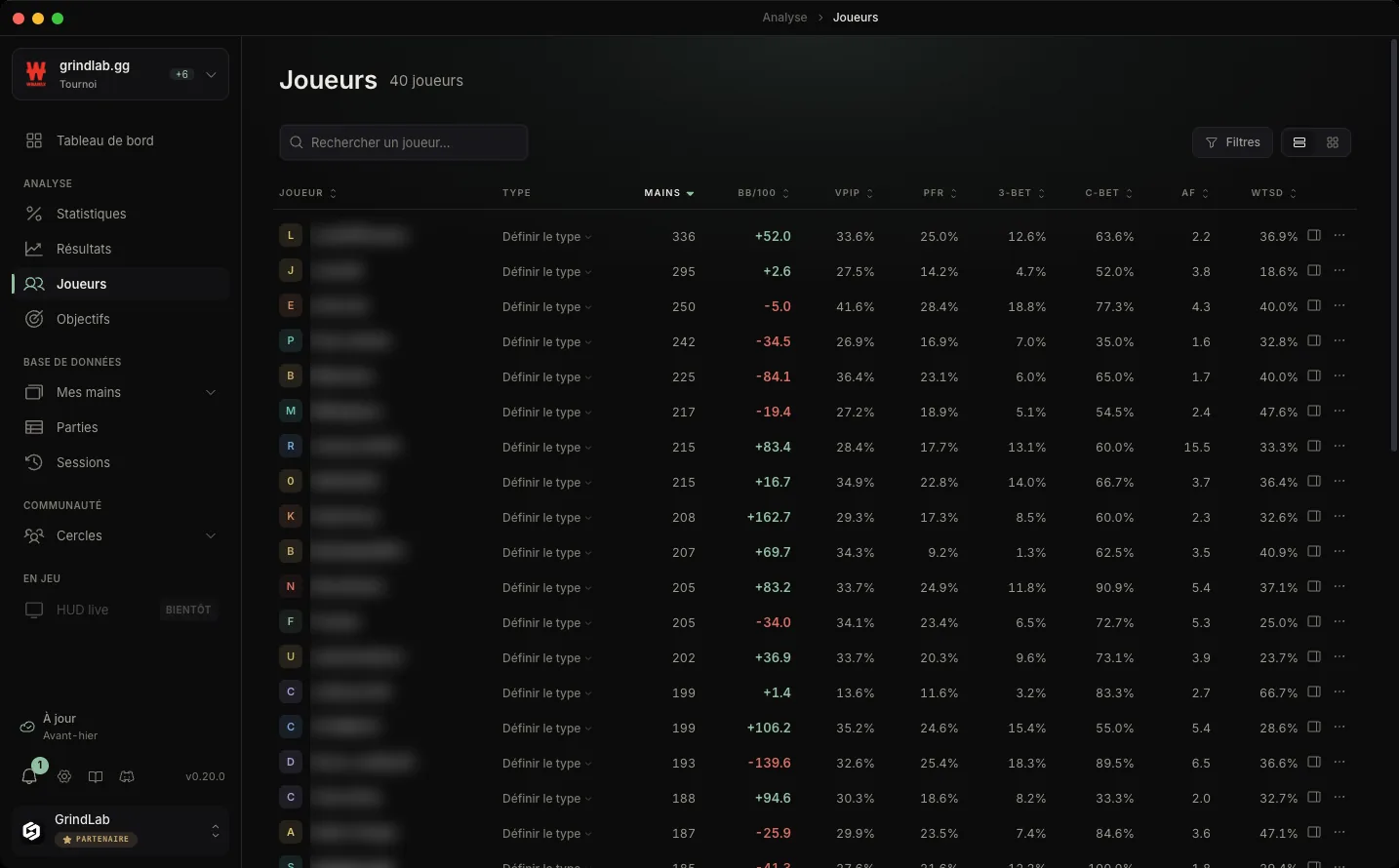
For each player: their type, the number of hands played with you, their BB/100 (their winrate over those hands), then their VPIP, PFR, 3-Bet, Fold v3B, C-Bet, WTSD and AF (Aggression Factor). Click a header to sort the list. The Grid view shows the same players as cards.
To find someone:
- “Search a player…” by screen name
- “Filters”: activity (seen today, in the last 7 or 30 days), sample (100, 500 or 1,000 hands and more), profile and room
The activity filter is about the date you met the player; their statistics cover all your hands with them.
A player's profile
“Set type” puts a player in a profile: Whale, Fish, Nit, Reg fish or Reg by default. Names and colours can be changed in Settings › Player types, and you can create your own types there.
The profile follows you wherever the player appears: in the replayer, on the table's seats, and in your shares “with context”, where it helps whoever reviews the hand understand your read.
A player's panel
Click a row to open the player's panel:
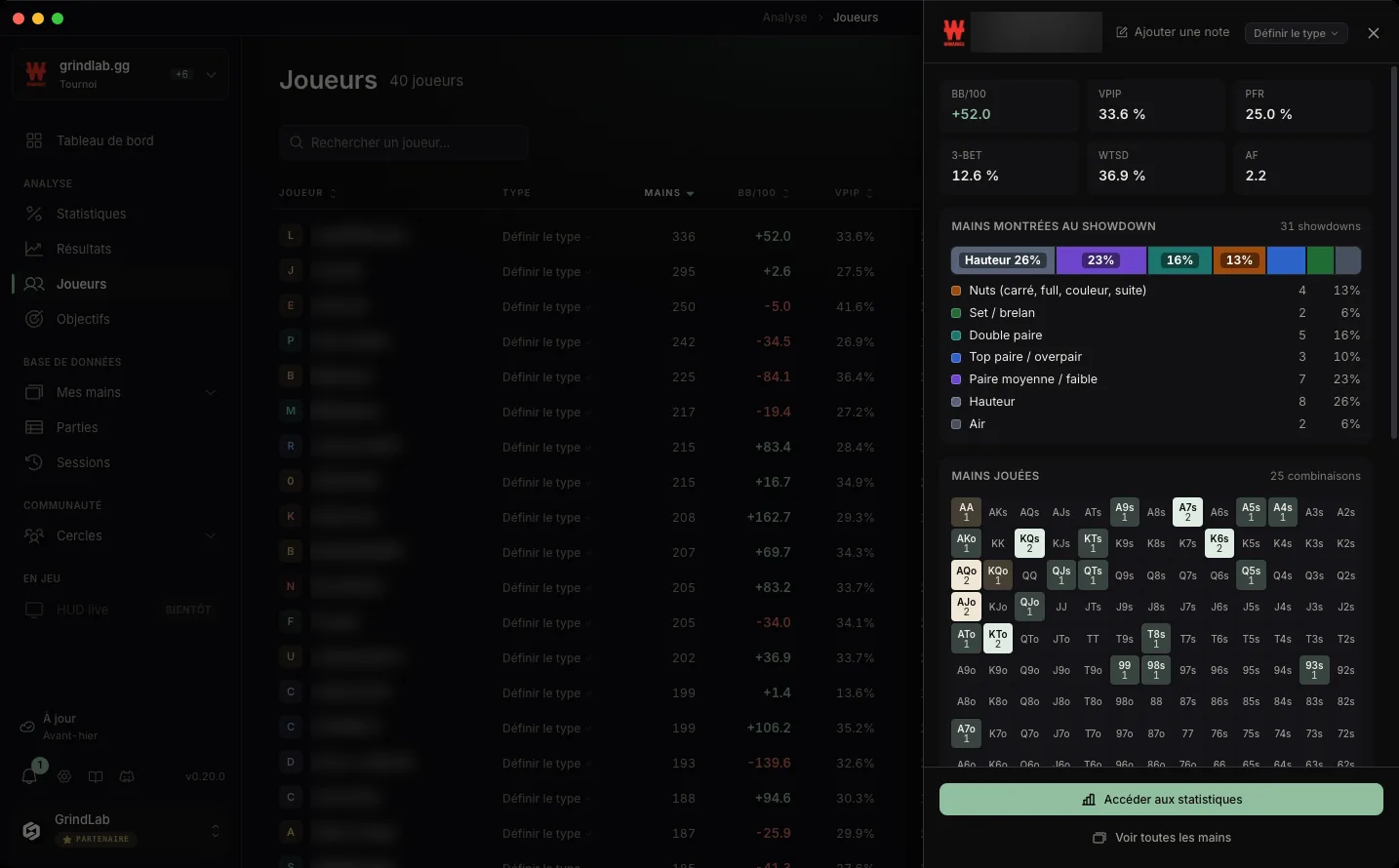
- their note, with “Add a note”
- their key figures: BB/100, VPIP, PFR, 3-bet, WTSD, AF
- their VPIP by position
- the hands shown at showdown, ranked by strength: nuts, sets, two pair, top pairs, middle pairs, high card, air
- the hands played: a 13×13 grid of every hand they have shown
- “View statistics” and “View all hands”
A row's menu gives the same access: “View their statistics”, “View hands”, “Add / edit a note”.
Their detailed statistics
“View their statistics” opens the Statistics page on this player: the same tables as for you, from preflop to river, by position. The page title lets you switch from your numbers to theirs. Only the BB/100 column is missing, since their net result over all their hands is not known.
An opponent with 20 hands does not have statistics, they have an anecdote. Read their VPIP and PFR from a few hundred hands, their 3-bet and c-bet from a few thousand.
From the player to the range
That is what the page is for. Before you assign a range in the Lab, look at who you were up against:
- a 45% VPIP and an 8% PFR: a player who calls a lot and raises little, whose calling range is wide and weak
- a 22% VPIP and a 19% PFR: a regular, whose open from a given position looks like the standard ranges
- a high WTSD: a player who goes to showdown, against whom bluffing earns little and thin value earns a lot
Build the typical ranges of these profiles once in your Ranges, then import them back into the Lab according to the player's type.
In the replayer
The same information sits right next to the hand: under each seat in the replayer, the player's VPIP, PFR and 3-bet as of the date of the hand, and in the seat's menu, their profile, your note and “Player statistics”.