
Reviews
Get a hand, an analysis or a game reviewed, give your take on other players' content, and follow all the feedback from the Reviews page.
A review is another player's opinion on your decisions: street by street, with a verdict and an explanation. It is the fastest way to step outside your own reading of a hand, and GrindLab makes it possible on everything you share.
Ask for a review
All it takes is sharing:
- with a public link, to whoever you want: a coach, a friend, a Discord group (see My analyses and Games)
- in a circle, to its members only (see Circles)
A hand, a Lab analysis, a selection of hands, a cash table or a whole tournament: anything that can be shared can be reviewed. Add a note to your share (“Not sure about my river bet…”) to say where your doubt is: the review will be more useful.
Give a review
Any signed-in player can review what is shared with them, on every plan. They cannot review their own content. On the shared page, click “Give your review”.
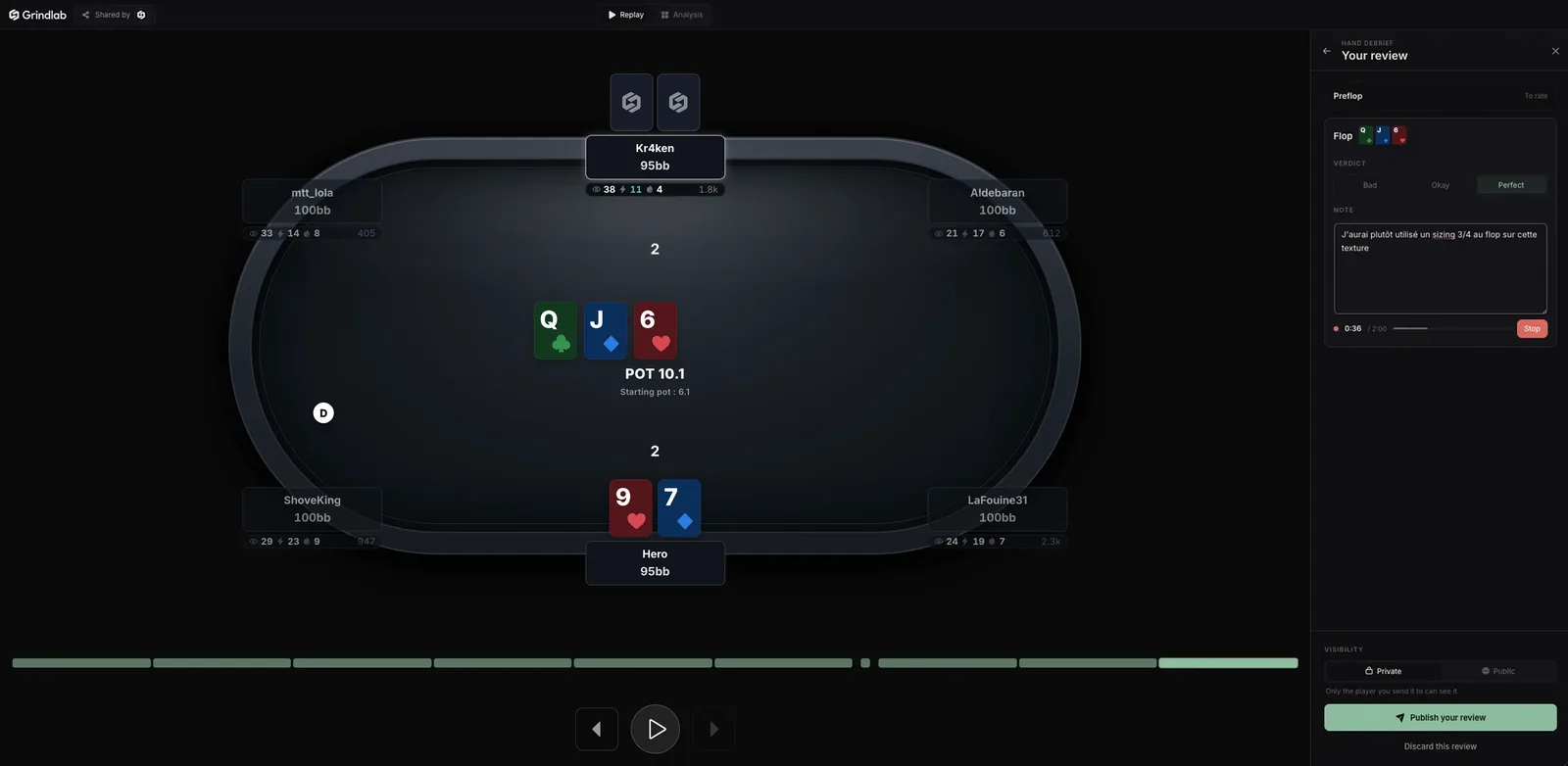
For a hand or an analysis, a “Your review” panel opens next to the table:
- For each street, a verdict: Perfect, Okay or Bad.
- A note to say why, or “Dictate” to say it out loud (two minutes at most, transcribed into text).
- The visibility: Private (only for the player you send it to, the default) or Public (visible to the circle and to anyone with the link).
- “Publish your review”.
Once it is published, “Copy for Discord” copies a ready-to-paste message with the link. If you came from a circle's feed, “Next Review” takes you straight to the next item.
For a game or a selection, the review covers several hands. The list of hands shows next to the replayer: “Review this hand” on the ones that matter, a verdict for each, then “Publish your review” with an optional overall comment. Thirty hands at most per review. The draft survives a page reload.
Receive a review
A review you receive shows up in several places:
- the notification bell: “Someone proposed a correction”, with the hand concerned
- the counter on Reviews, in the menu
- the green dot on “Shared”, under My analyses
- the analysis's “Shared” button, which shows how much feedback it got: “See feedback”
Under each review, an exchange lets you reply. Only the reviewer and the reviewed player can write in it: it is a conversation, not a public comment thread.
The Reviews page
Reviews, in the “Community” section of the menu, gathers the reviews you have received and given, one line per piece of content, grouped by period (“This week”, “A month ago”, “Older”).
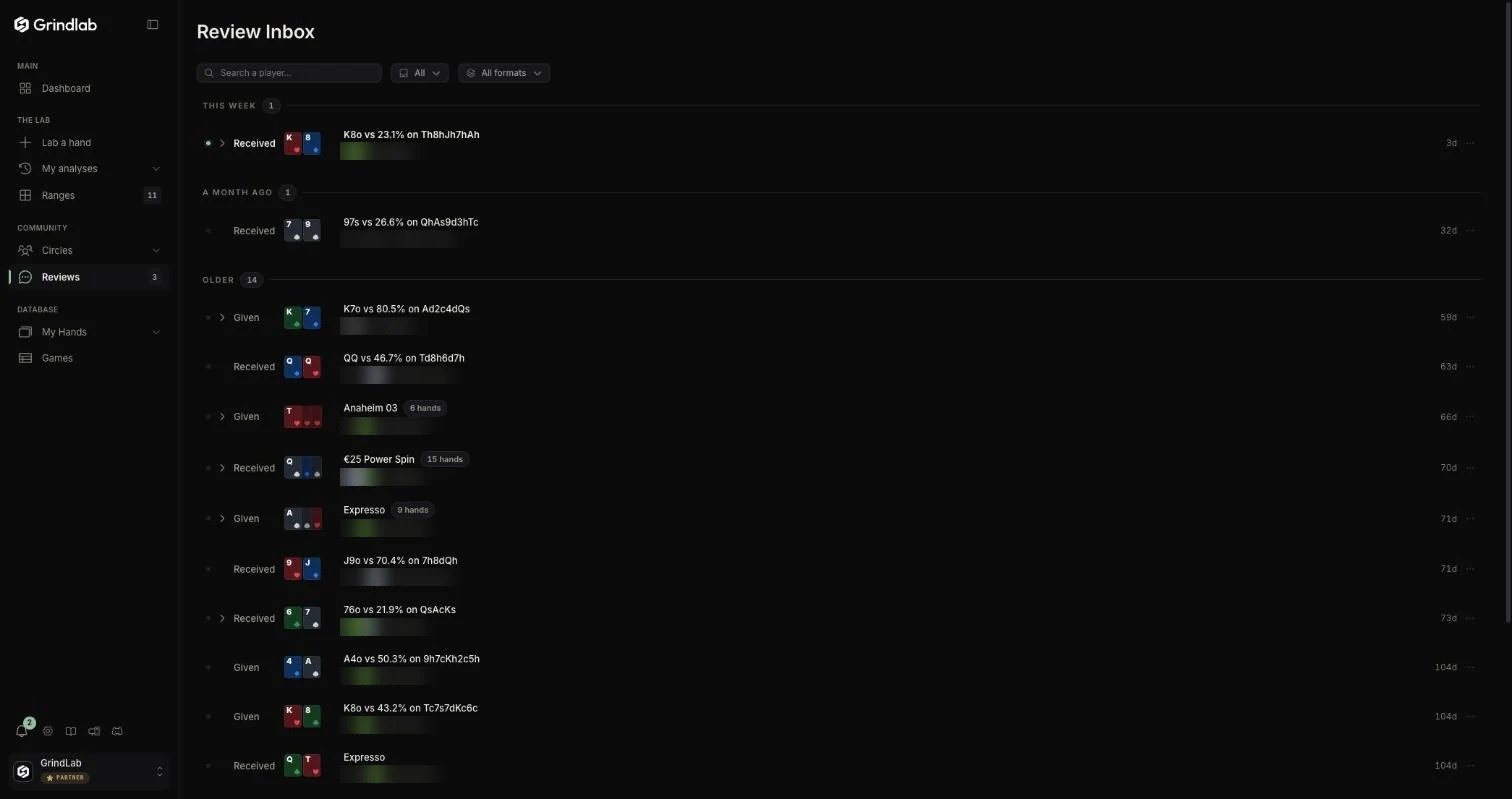
- The filters: “All”, “Received” or “Given”; the format (MTT, Spin, Cash game); a search by player.
- A line expands to show each review of that content. “Open the review” displays it on the shared page.
- On a review you received: “Mark as read” or “Mark as unread”. On a review you gave: “Edit my review”, “Share the link”, “Delete my review”.
Reviews of content shared only in a circle are read in the circle's feed, by opening the item.
Reviewing well
A few habits that make a review useful rather than polite:
- Judge the decision, not the result. A losing call can be “Perfect”, a winning fold “Bad”.
- Say which range you are reasoning on. “Against a 25/20 reg, their c-bet range is too wide for this fold” beats “fold too tight”.
- One review per street that matters. No need to comment on an obvious preflop fold: the verdict is enough.