
Importing a hand into the Lab
Paste a hand history, pick up a hand marked “To review” or open a hand from the Tracker: the Lab fills in cards, positions, stacks and actions.
Re-entering a hand takes a minute, importing it five seconds.
Three ways to open a hand
The arrow to the right of “New Analysis”, at the top of the Lab (and on the Dashboard, where the button reads “Start new analysis”), opens a menu:
- “Paste a hand”: you paste the text of a hand history
- “My hands to analyze”: the hands marked “To review” in My Hands or in the Tracker
- “Reopen an analysis”: an analysis you already did, from My analyses
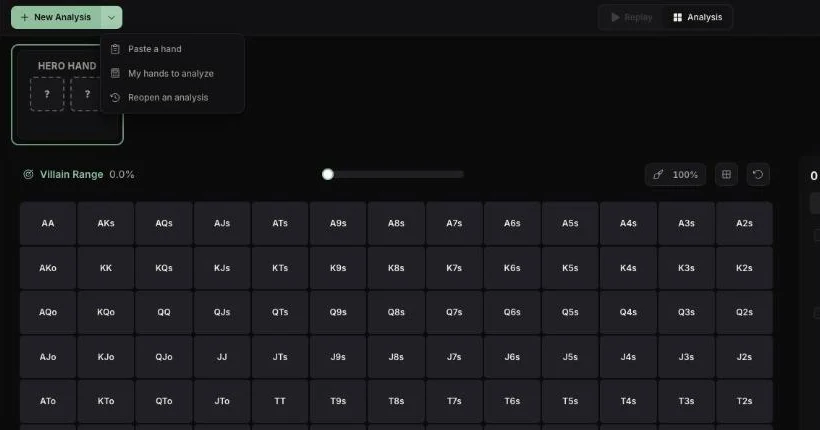
The most common path skips this menu: on a hand in My Hands or the Tracker, “Start an analysis” (the hand's menu) or “Analyze in Lab” (the replayer) opens the Lab on that hand. From the Tracker, it opens in your browser.
Paste a hand history
Copy the hand from your poker client, choose “Paste a hand”, paste the text and click “Import Hand History”. The Lab picks up:
- your cards, the board, each player's position and stack
- every action, street by street, with the amounts
- blinds, ante, format (cash, tournament, spin), table size
- each player's bounty in KO tournaments, the rake in cash games
- player names and the cards shown at showdown
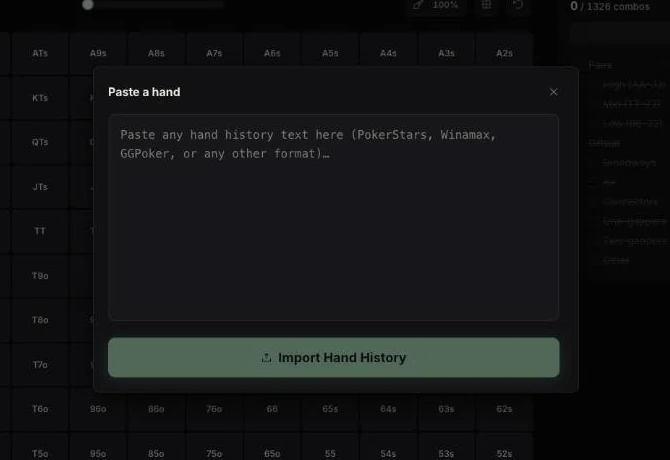
You land on step 4 of the analysis: the villain's range, which import deliberately does not guess. Text is limited to 10,000 characters (plenty for a full tournament hand); a link is not enough, paste the hand history text.
Supported rooms
| Room | Note |
|---|---|
| Winamax | |
| PokerStars | Zoom included |
| GGPoker | GG network, Natural8 included |
| PMU, Unibet, Betclic | |
| iPoker | XML format |
| CoinPoker | |
| ACR (Americas Cardroom) | |
| Poker Bankroll Tracker | exports |
For any other format (888poker, partypoker, WPT Global…), an AI reader takes over: check the amounts. A hand that does not go through? Send the hand history on Discord to get the format added.
When a hand cannot be analyzed
The Lab refuses the hand, with a message that says why, in four cases:
- your cards are unknown
- you made no voluntary decision (a big blind folded with no raise, for example)
- the table has more than nine players: “Analysis is limited to tables of 2 to 9 players”
- a session is in progress: “Analysis is unavailable during a session”
On the Free plan
Import is open to everyone. An imported hand then follows the Lab's rule: one full hand a day up to the flop, then the Grinder window (see Analyze a hand). The Hand of the Day, on the Dashboard, comes on top without counting.