Best Poker Software in 2026: The Landscape by Job
Searching for "the best poker software" is a bit like searching for "the best tool" in a toolbox. A tracker, a solver and an equity calculator do not answer the same question. Comparing them head to head makes no sense; sorting them by job does.
This guide does that sorting. For each category you will find what it is for, the reference programs, their platform and their model (free, license or subscription), then a frank view of when each one is the right choice. We make GrindLab, and we say so when a competitor does better than we do: for pure equilibrium computation, for example, a dedicated solver is unbeatable.
Prices change often and vary by tier, so we do not quote them. Check each publisher's site, and the GrindLab pricing page for ours.
The five families of poker software
Before naming names, let's set the categories. Most serious players end up using at least two of these families.
| Family | The question it answers | Examples |
|---|---|---|
| Tracker and HUD | What am I doing, and what are my opponents doing? | PokerTracker 4, Holdem Manager 3, Hand2Note, Xeester, Poker Copilot, GrindLab Tracker |
| Solver | What is the equilibrium strategy in this spot? | PioSolver, GTO+, GTO Wizard |
| Equity calculator | How much is my hand worth against this range? | Equilab, Flopzilla, GrindLab's Lab and public calculator |
| Range management | Which hands do I play from which position, and how do I find them again? | Range Manager, GrindLab Ranges |
| Training | Do I reproduce the right decision under pressure? | GTO Wizard, FreeBetRange, PokerSnowie, GrindLab tools |
The rest of this article follows that order.
1. Trackers and HUDs: measuring what happens
A tracker reads the hand history files your room writes on your computer, stores them and derives your results, your stats and your opponents' stats. The HUD (Heads-Up Display) is the part you see in game: numbers shown on the table, under each player. If these ideas are new, our articles on the poker HUD explained and on VPIP and PFR stats cover the basics.
PokerTracker 4
What it is for: the long-standing benchmark. A very powerful local database, a filter engine that can isolate almost any situation, a HUD configurable to the pixel, a huge stat library.
Platform: mainly Windows. Model: paid license.
Who it suits: the high-volume player who writes queries against their database and has built a custom HUD. Full comparison: GrindLab vs PokerTracker 4.
Holdem Manager 3
What it is for: the other long-standing pillar, on the same ground as PokerTracker 4: import, local database, reports and a highly configurable HUD, with its own interface choices.
Platform: Windows. Model: paid.
Who it suits: the Windows regular who wants a mature ecosystem and deep stats. Full comparison: GrindLab vs Holdem Manager 3.
Hand2Note
What it is for: the tracker that became, within a few years, the favorite of many online regulars, known for its speed, dynamic popups and range-based stats.
Platform: Windows. Model: subscription, several tiers.
Who it suits: the mid and high stakes regular who wants the most detailed HUD on the market. Full comparison: GrindLab vs Hand2Note.
Xeester
What it is for: a tracker and HUD well known among French players, largely because it has supported Winamax for a long time.
Platform and model: check the publisher's site, which updates its offer.
Who it suits: the player on the French market who wants a Winamax HUD in a long-established tool. Full comparison: GrindLab vs Xeester.
Poker Copilot
What it is for: a tracker with a HUD, known for being one of the few built for macOS at a time when almost everything ran on Windows.
Platform: macOS and Windows. Model: paid.
Who it suits: the Mac player who wants a classic tracker. Full comparison: GrindLab vs Poker Copilot.
GrindLab Tracker
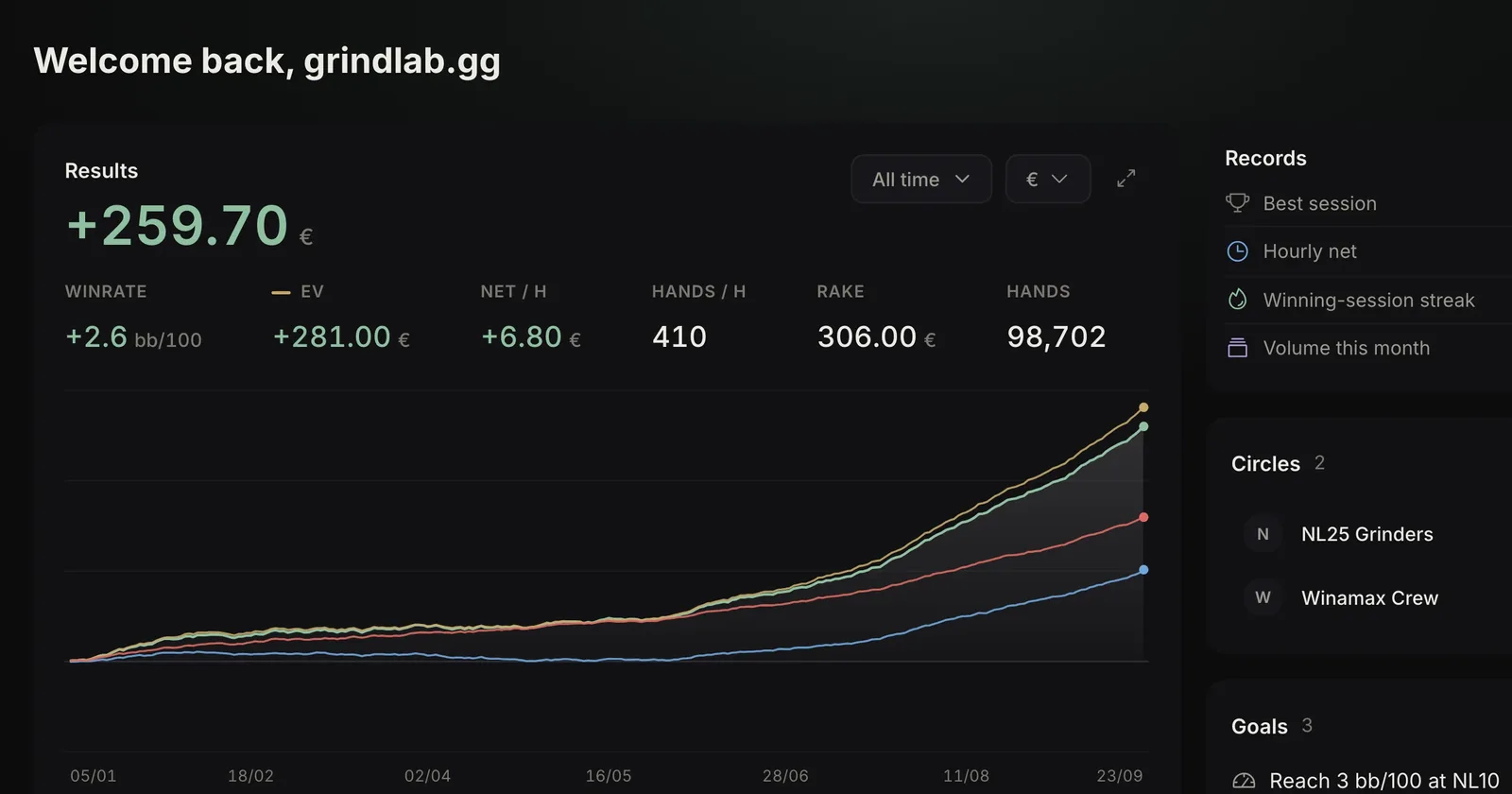
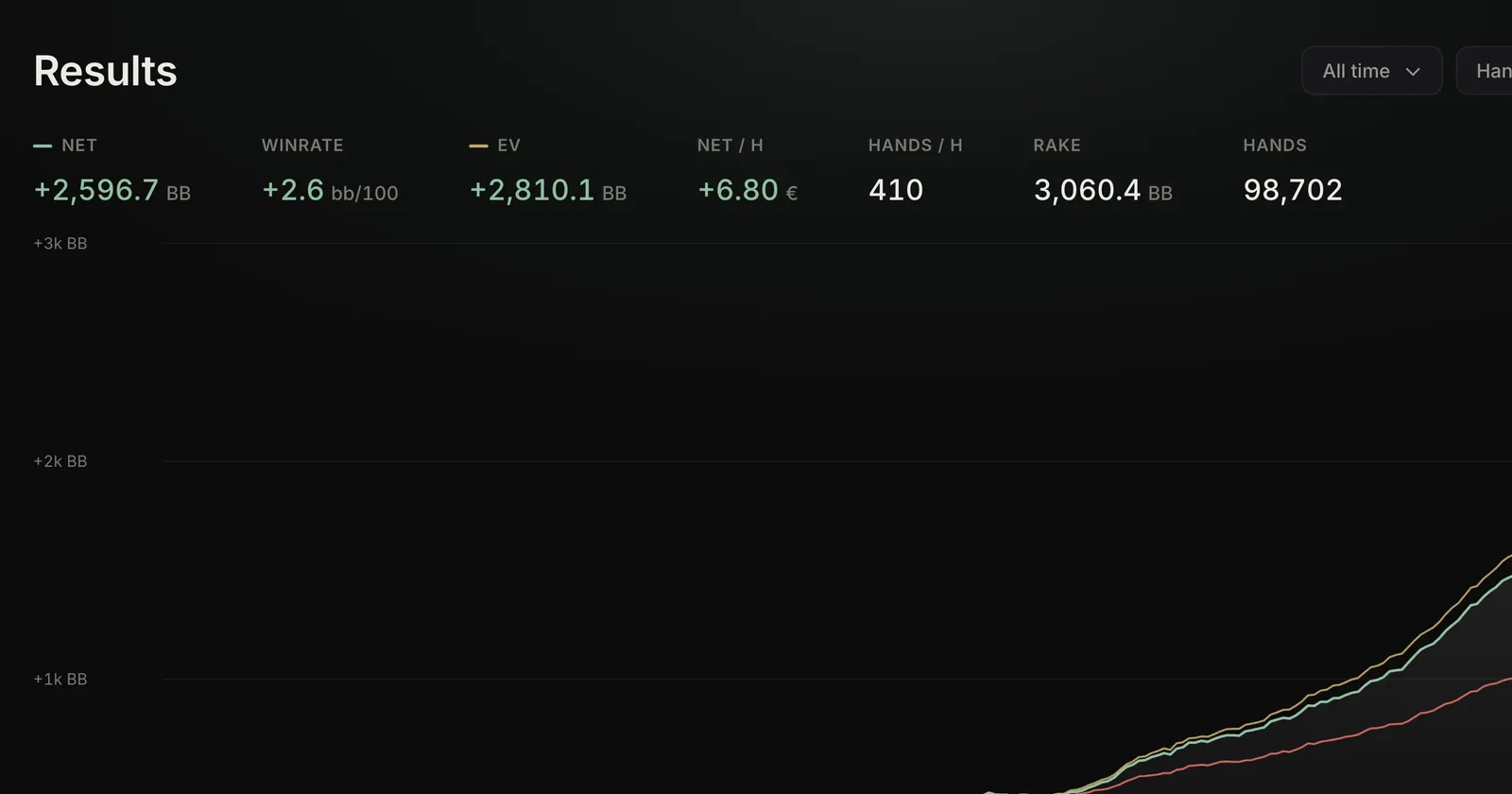
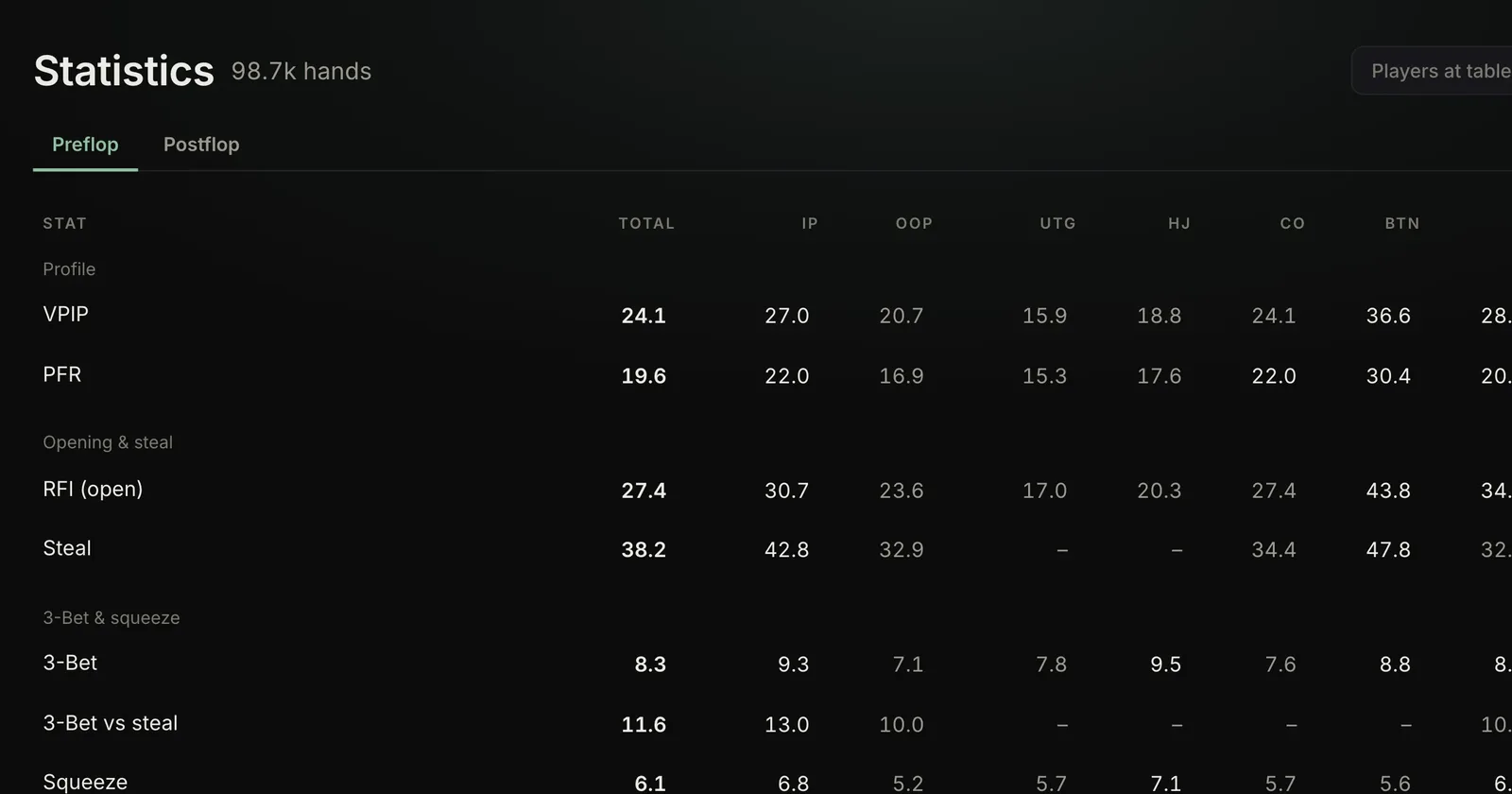
What it is for: GrindLab's desktop app. It follows the folders where your rooms save your hands (Winamax, PokerStars, PMU, Unibet; Betclic goes through an export, and an “Other folder” is accepted), imports them while you play and sends them to your account. From them it builds your results, your sessions, around fifty stats compared with your field and your opponents' profiles. The HUD shows a plate with three numbers under each player and a card on hover, with typed or dictated notes and hand marking: it works on Winamax today and is part of the Grinder plan.
Platform: Windows 10 and 11, macOS 12 or later (Intel and Apple Silicon, signed and notarized). Model: free with no hand limit on the Free plan (results and seven key stats over 30 days); the Grinder plan opens every stat, any period, player profiles and the HUD.
Its real difference: a hand marked “to review” opens prefilled in the Lab, on the same account, so you go from what happened to what to do. No database to maintain: everything is synced.
Its limits, stated plainly: no HUD outside Winamax for now, no arbitrary query engine like PokerTracker 4's, no PLO. Full details on the GrindLab Tracker page and in the complete GrindLab Tracker overview.
How to pick a tracker
- You are starting out or play micro stakes: a free tracker is plenty. At these stakes, the volume per opponent is low and a very detailed HUD adds little. See free poker tracker.
- You are on Mac: GrindLab Tracker or Poker Copilot, with no virtual machine. See Mac poker tracker.
- You mostly play on Winamax: GrindLab Tracker (HUD on Grinder) or Xeester. See Winamax poker tracker.
- You play high volume across several international rooms: Hand2Note, PokerTracker 4 or Holdem Manager 3 keep the edge on multi-room HUDs.
2. Solvers: computing equilibrium
A solver computes an equilibrium (GTO) strategy for a spot you define: starting ranges, allowed bet sizes, stack depth. It answers "how do I play unexploitably here?". If the topic is new, start with our guide poker solver: what it does, then GTO vs exploitative.
PioSolver
What it is for: the reference desktop solver. You build the game tree, run the computation and explore the solution node by node. Powerful, demanding in time and computing power.
Platform: Windows. Model: paid license, several editions.
Who it suits: the advanced player or coach who wants to build their own trees and do deep work.
GTO+
What it is for: a desktop solver known for its more approachable interface and good value, widely used for postflop study.
Platform: Windows. Model: paid license.
Who it suits: the player who wants to solve their own spots without a high-end license.
GTO Wizard
What it is for: a web platform with a huge library of precomputed solutions, online solving and a training mode against the equilibrium strategy. It is the most widely used GTO tool today.
Platform: browser. Model: limited free tier and subscriptions.
Who it suits: anyone who wants to study GTO without setting up a tree. Comparison: GrindLab vs GTO Wizard.
Where does GrindLab fit?
GrindLab is not a solver, and does not claim to be. The Lab does not compute an equilibrium strategy: it computes your hand's equity against the range you assign to a specific opponent, and the EV of each possible action. It is an exploitative approach that complements GTO. If your goal is to know the equilibrium c-bet frequency on a given flop, a solver is the right tool, not GrindLab.
3. Equity calculators: checking a spot
An equity calculator answers the most common question in poker: what share of the pot does my hand win against this hand or this range? It is the building block of every decision, explained in our article on poker equity.
Equilab
What it is for: the long-standing free calculator, with a range editor and a few training tools. For many players it was the entry point to hand versus range thinking.
Platform: Windows. Model: free. It has not had a major update in several years. Comparison: GrindLab vs Equilab.
Flopzilla
What it is for: the reference tool for seeing how a range hits a flop: share of pairs, draws, strong hands. Essential for understanding board texture.
Platform: Windows. Model: paid (one-time purchase). Comparison: GrindLab vs Flopzilla.
GrindLab's equity tools
GrindLab offers two levels:
- The public equity calculator, no account needed: poker equity calculator. It belongs to a set of free poker tools: pot odds, outs, EV, ICM, variance and more.
- The Lab, with an account: your hand against a range weighted combo by combo, street by street, with a verdict and the EV of each action. Preflop, the computation runs a Monte Carlo simulation over 300,000 deals; postflop, an exact enumeration of the cards to come. On the Free plan, equity is unlimited; actions, verdict and EV are open on one hand a day, up to the flop.
Our view: for a quick check, the public calculator is enough. To study how a range hits thousands of flops, Flopzilla remains an excellent specialist tool.
4. Range management: organizing your preflop
Building ranges is good; finding them, comparing them and tying them to your real hands is what makes them useful. The approach is covered in how to build poker ranges.
Range Manager
What it is for: a lightweight app to create, file and view ranges, with a one-time purchase instead of a subscription.
Platform: Windows and Mac. Model: paid, one-time purchase. Comparison: GrindLab vs Range Manager.
GrindLab Ranges
What it is for: a range editor in the browser, with folders, search, multiple actions and frequencies, and file import (including files exported from Hand2Note). Ranges are then used directly in the Lab as a villain range. Your account starts with a Starter Pack folder of ten 100bb cash ranges.
Model: 5 ranges created and one file imported on Free, unlimited on Grinder.
For a public baseline without an account, our preflop range charts and push/fold charts are open to everyone, consistent with our articles on open ranges by position and push or fold.
5. Training: repeating the right decision
Knowing the right decision is not enough: you have to reproduce it, fast, at the table. Training tools turn theory into reflex.
GTO Wizard (training mode)
You play spots against the equilibrium strategy and get a score on each decision. Excellent for anchoring GTO frequencies.
FreeBetRange
What it is for: a trainer focused on GTO preflop ranges, in the browser. Model: limited free tier, premium subscription. Comparison: GrindLab vs FreeBetRange.
PokerSnowie
What it is for: an opponent and coach based on an artificial intelligence that plays a near-equilibrium strategy and grades your decisions. Model: subscription. Comparison: GrindLab vs PokerSnowie.
GrindLab's training tools
GrindLab trains on your hands rather than generic spots: the Hand of the Day, complete on the Free plan, offers a spot to solve every day; the Lab replays the hands you marked during the session; circles let you get reviews from other players or a coach. The method that goes with it is in how to study poker and how to review your sessions.
The criteria that really matter
Beyond features, five practical criteria often separate two programs in the same family.
The rooms it reads
This is the first filter, and the one most often forgotten. A tracker is only as good as the hand histories it can read. Before installing anything, check that your main room is supported, and how: a folder followed continuously or a manual export. The HUD also depends on the program's ability to recognize the room's windows: a tracker can import a room without showing a HUD there, which is GrindLab's case outside Winamax.
Local database or synced account
Long-standing trackers store your hands in a database installed on your machine. The upside: considerable query power. The downside: backups, migration every time you change computers, maintenance as the database grows. Tools synced to an account (GrindLab's choice) remove that burden, at the cost of less freedom to write arbitrary queries. If you play on two machines, or want your hands in the browser, this criterion weighs a lot.
The operating system
Much poker software was designed for Windows. On Mac you need either a native tool, a web tool or a virtual machine, with the slowdowns and incompatibilities that implies. Desktop solvers, in particular, are almost all Windows-only.
The language
Most tools are in English, which is fine for anyone reading this. Language matters more when you coach or study with players from other countries: a review circle where half the members read stats in French and half in English works better when the tool speaks both. GrindLab is available in English, French and Spanish: the site, the Tracker and the guide. Support and documentation quality matter too: before committing to a tool, check how recent its help pages are and how fast its team answers.
The cost over time
A one-time license, a monthly subscription and a free plan are not assessed the same way. Add up what your tool stack really costs over a year, and compare it with your volume and stakes. At NL2 or NL5, a pile of subscriptions can exceed your expected winnings; this is covered in our guide to poker bankroll management.
Summary table
| Software | Category | Platform | Model |
|---|---|---|---|
| PokerTracker 4 | Tracker and HUD | Mainly Windows | Paid license |
| Holdem Manager 3 | Tracker and HUD | Windows | Paid |
| Hand2Note | Tracker and HUD | Windows | Subscription |
| Xeester | Tracker and HUD | See publisher | See publisher |
| Poker Copilot | Tracker and HUD | macOS and Windows | Paid |
| GrindLab Tracker | Tracker and HUD (Winamax) | Windows and macOS | Free with no hand limit, HUD on Grinder |
| PioSolver | Solver | Windows | Paid license |
| GTO+ | Solver | Windows | Paid license |
| GTO Wizard | Web solver and trainer | Browser | Limited free tier and subscriptions |
| Equilab | Equity | Windows | Free |
| Flopzilla | Equity and texture | Windows | One-time purchase |
| GrindLab Lab | Equity, EV, villain ranges | Browser | Free and Grinder plans |
| Range Manager | Ranges | Windows and Mac | One-time purchase |
| FreeBetRange | Preflop training | Browser | Limited free tier and subscription |
| PokerSnowie | AI training | Desktop | Subscription |
Business models change: always check the publisher's site before buying.
Which stack for your profile?
You are a beginner
You need neither a solver nor a fifty-stat HUD. Start with the fundamentals in how to play poker, then:
- a free tracker to see your real results;
- an equity calculator to check your instincts;
- a range chart to structure your preflop.
GrindLab covers all three with no credit card: the Tracker on the Free plan, plus the equity calculator and preflop ranges open to everyone. If you are wondering whether the tool suits you, read who is GrindLab for.
You are a cash game regular
The classic pair: a tracker with a HUD to exploit recurring opponents, and an analysis tool to understand your hard spots. On Winamax, GrindLab Tracker (Grinder plan) does both on one account. On other rooms, many players keep Hand2Note or PokerTracker 4 for the HUD and use GrindLab for study. The strategy that goes with it: cash game poker strategy.
You play tournaments (MTT, Spin)
In tournaments, ICM changes decisions near the bubble and at the final table. The Lab reasons in chips and big blinds, with the ante and an all-in opponent's bounty built into your call, but it has no ICM model: for that, our public ICM calculator or a specialist tool (ICMIZER, HoldemResources Calculator) takes over. The basics are in ICM explained and poker tournament strategy.
You are an advanced player or a coach
A solver then becomes essential for theoretical work. A coach also needs a place to receive and comment on students' hands: that is the role of GrindLab circles (up to 50 members per circle; founding one requires the Grinder plan).
What to keep in mind before buying
Start with the problem, not the software. If you don't know where you lose money, you need a tracker. If you know where but not why, you need an analysis tool. If you want the full theory of a spot, you need a solver. Our article on how to find poker leaks helps with that first diagnosis.
Check compatibility with your room and your system. A tracker that cannot read your room or run on your machine is useless to you, whatever its reputation.
Follow your room's rules. Most forbid decision-support tools during play: a HUD is generally allowed, a solver or a calculator open mid-hand is not. That is why GrindLab's Lab closes during a live session.
Try before you pay. Most publishers offer a trial or a free version. At GrindLab, the Free plan has no end date, and the Grinder plan has a 14-day trial on the first subscription.
Key takeaways
- There is no single best poker software, but a best tool per job: tracker, solver, equity, ranges, training.
- PokerTracker 4, Holdem Manager 3 and Hand2Note remain the multi-room HUD benchmarks; GrindLab Tracker is free, native on Mac and tied to the Lab, with a Winamax HUD on the Grinder plan.
- PioSolver, GTO+ and GTO Wizard are the GTO tools; GrindLab is not a solver.
- Equilab and Flopzilla are the classic calculators; GrindLab's free equity calculator runs in the browser, no account needed.
- Most players combine two or three tools. Choose by profile, room and system.