Poker HUD Explained: What It Is, How to Read It and What Rooms Allow
A player raises from the button for the third time in ten minutes. Are they wide, or did they just get good cards? Without data, you guess. With a HUD, you read under their seat that they open 48% of their buttons over 600 hands, and you know what to do.
This article explains what a poker HUD is, where its numbers come from, which ones to display, how to read it in three seconds and what rooms allow. For GrindLab's own HUD, see GrindLab's live HUD.
What a poker HUD is
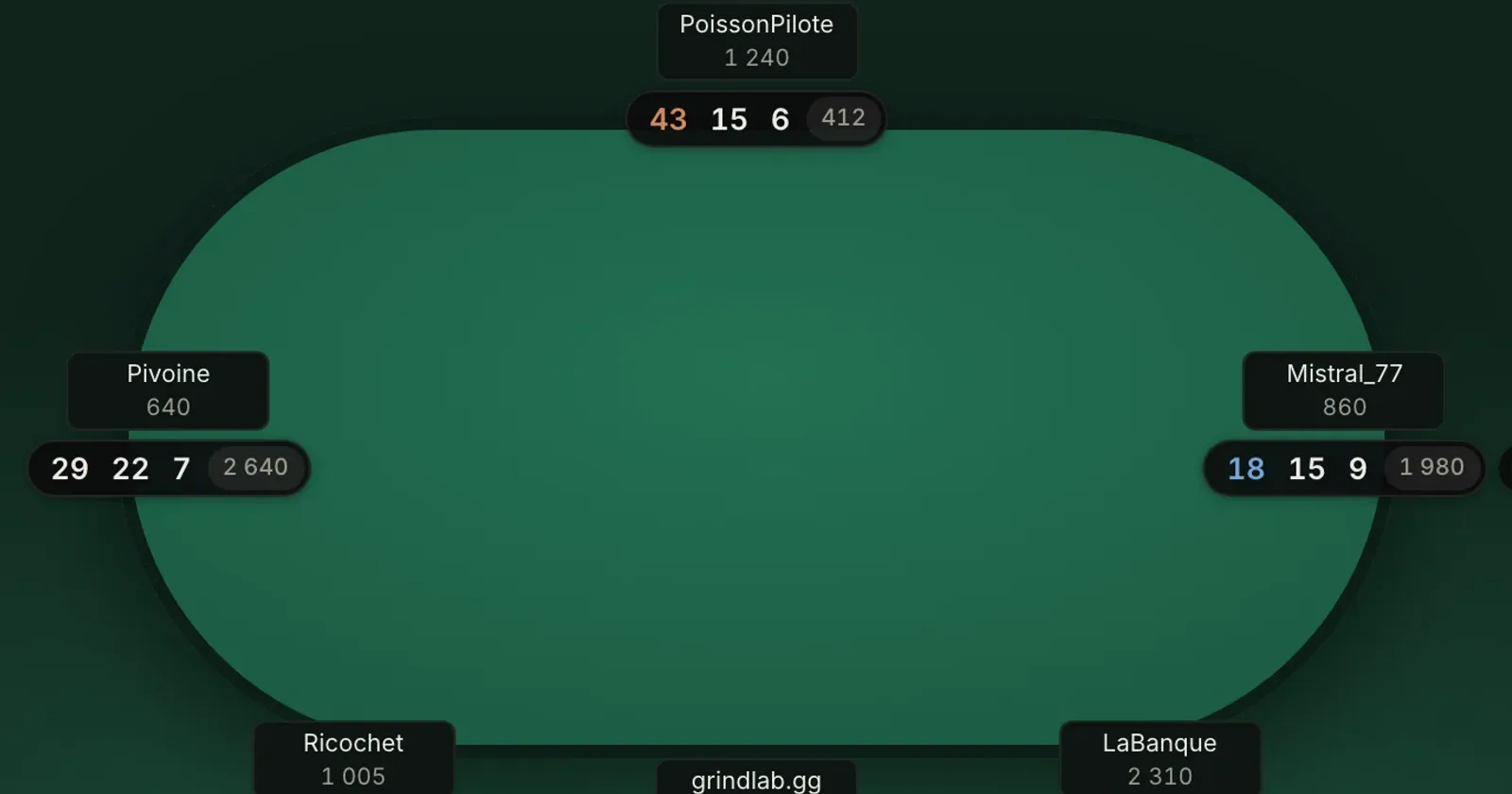
HUD stands for Heads-Up Display, a term from aircraft cockpits: information shown in your field of view, without looking away. In online poker it is a transparent layer over the table window. Next to each seat, a small box shows statistics about the player sitting there.
A HUD is never standalone software. It is provided by a tracker, a program that reads the hand histories the room writes on your computer, stores them in a database and computes frequencies for every player. The HUD is just the shop window of that database: no history, no numbers. The article on poker hand history files explains where those files live.
Where the numbers come from
A HUD's numbers come from the hands you have played with each opponent. You sit with a player for 500 hands: the tracker has seen 500 of their preflop decisions and derives their VPIP, PFR and 3-Bet. A player you have never met starts empty.
There are also bought or traded hand databases ("datamining") that give stats on players you have never faced. Many rooms explicitly forbid it. Stick to your own hands.
Anatomy of a HUD
Almost every HUD is built from the same pieces.
| Element | Role |
|---|---|
| The panel (or stat box) | 3 to 5 numbers under each player, readable at a glance |
| The hand count | the sample size, so you know how much credit the numbers deserve |
| Colours | flag a number above or below a norm |
| The secondary card (popup) | detailed stats, on hover or click |
| Notes | what you observed that the numbers don't say |
| The profile | a label (nit, LAG, calling station) set by you or suggested by the software |
The golden rule: the panel must read in three seconds. If you have to decode fifteen numbers while the clock runs, the HUD hurts more than it helps.
Which stats to display
In cash games
The classic 6-max cash panel holds three stats: VPIP, PFR and 3-Bet. They describe width, preflop aggression and pressure on opens. The VPIP-PFR gap, read at a glance, tells you whether the player is passive.
The secondary card takes the postflop stats: C-bet, Fold to C-bet, AF, WTSD, W$SD, and Fold to 3-Bet. All of them are defined, with formulas and values by profile, in the guide to VPIP, PFR and 3-Bet poker stats.
In tournaments
In MTTs, 3-Bet matters less as stacks get shorter. Steal from the cutoff, button and small blind becomes the key stat, along with blind defence and, late in the tournament, shove frequencies.
In Spins and Expressos
Three-handed with short stacks, the game is played all-in: open shove and call vs a shove replace 3-Bet. VPIP stays useful to spot players who limp a lot.
Reading a HUD in three seconds
Here is a simple method to apply every time a player enters the pot.
- Check the hand count. Fewer than 50: ignore almost everything except an extreme VPIP. More than 300: preflop stats are solid.
- Read VPIP. Below 17%: tight. 20 to 28%: regular. Above 35%: wide.
- Read the gap to PFR. Narrow gap: aggressive. A gap of 15 points or more: passive.
- Check 3-Bet if you are opening. Below 4%: their 3-bet is value. Above 12%: they bluff often.
- Adjust one thing. Widen your steals against a nit, value bet bigger against a calling station, call a LAG's barrels more often.
Adjustments by profile are covered in poker player types, and the logic behind them in GTO vs exploitative.
Sample size, again and always
| Stat | Hands for an exploitable read |
|---|---|
| VPIP, PFR | 50-100 |
| 3-Bet | 200-300 |
| Fold to C-bet | 300-500 |
| Postflop AF | 500-1,000 |
| WTSD, W$SD | more than 1,000 |
A serious HUD reminds you visually. GrindLab's, for example, shows a number in grey when it rests on fewer than 10 opportunities.
HUDs and room rules
This is the question to ask before installing anything: does the room you play on accept HUDs? There is no single answer. Each room sets its own rules, and they change.
What you generally see:
- Real-time decision aids (a solver or adviser telling you what to play during the hand) are widely forbidden.
- Bought or shared hand databases (datamining) are often forbidden.
- HUDs fed by your own hands are accepted on some rooms, limited or forbidden on others.
- Several rooms publish a list of permitted and prohibited tools in their terms or help centre.
Our advice is simple: read the room's terms before using a HUD, and if in doubt, ask its support. Do not rely on a forum or an article (this one included) for a rule that can change.
GrindLab applies two safeguards of its own. The Lab, the equity and EV analysis tool, is closed during a live session. And when the PokerStars client is open, a PokerStars player's card hides their profile, in line with PokerStars' rules on third-party tools.
HUDs available today
The best-known HUDs come from the big desktop trackers: PokerTracker 4, Holdem Manager 3 and Hand2Note. They are highly configurable, paid, and built for Windows first. Their room coverage varies: check each publisher's official list for yours. The roundup of the best poker software places them side by side.
GrindLab Tracker, free on Windows and macOS, imports your hands from Winamax, PokerStars, Unibet, PMU and Betclic. Its HUD works on Winamax today and is part of the Grinder plan: a plate of three stats under each player, a quick card on hover (preflop, aggression, defence, showdown), typed or dictated notes, a profile per player and a bookmark to keep a hand for review. Plates place themselves, and their content follows the format: VPIP, PFR and 3-Bet in cash, VPIP, PFR and steal in tournaments, VPIP, open shove and call vs a shove in Spins. Every setting is in the HUD chapter of the guide, and plans are on the pricing page.
If you play on Winamax, the Winamax tracker article walks through setup step by step.
What a HUD does not do
- It does not play for you. It gives a tendency, not your opponent's hand.
- It does not replace review. Real mistakes are found after the session, in your own hands: see how to review poker sessions.
- It says nothing about a stranger. A new player starts empty; your first decisions against them rest on the general tendencies of the stake.
- It can mislead on small samples. A 60% VPIP over 12 hands is an anecdote.
- It does not know the context. A tilted, rushed or tired player plays differently from their stats. That is what notes are for.
HUDs and multi-tabling
A HUD shows its full value when you play several tables. At four or six tables at once, you cannot remember every opponent's style; the panel does it for you. Three habits help:
- Keep the panel tiny. The more tables you open, the fewer numbers you can read per decision. Three stats and the hand count is the limit.
- Use colours rather than numbers. An orange or blue number catches the eye faster than a value you have to compare with a norm.
- Leave the detail for later. The secondary card and the notes are for the hands where you have time; the rest of the review happens after the session.
Setting up a HUD well: five tips
- Fewer stats, better read. Three stats on the panel, the rest in the card.
- Always show the hand count. It tells you how much to trust everything else.
- Separate formats. Cash VPIP and tournament VPIP do not mix.
- Take short, dated notes. "River overbet = nuts, 3 times" is worth more than a number.
- Mark the hands that made you hesitate and review them cold. That is where a HUD becomes a tool for improving, not just for reading.
Conclusion
A poker HUD turns the hands you have played into an instant read on your opponents. Set up well, it fits in three stats you read in three seconds, with a hand count that tells you when to trust them. Before installing one, check what your room allows.
To go further, GrindLab Tracker links the HUD, the Statistics page and the review of your hands in a single tool. Download the free poker tracker and start by importing your hand histories.