
GrindLab Tracker: the free poker tracker that imports your hands automatically
Every tracker's weak point is the import step. You play, you plan to come back and review your sessions, and three weeks later you have a hand history folder bursting at the seams that you never opened in your tool. The manual gesture (export, unzip, drag-and-drop, pick a screen name) is exactly what kills the review habit before it even starts.
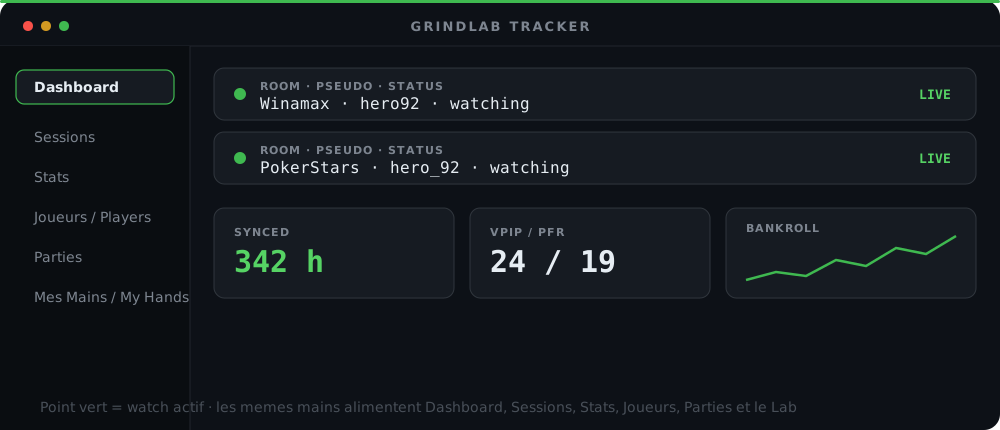
GrindLab Tracker fixes this at the root: it's a free desktop app, for Windows and Mac, that watches your hand history folders and syncs your hands to your GrindLab account automatically, in the background, while you play. You don't even need to have it open for it to work. This article covers how it works, how to set it up, and what syncing unlocks once your hands land in the cloud.
What GrindLab Tracker actually does
GrindLab Tracker is built on Electron, which lets it run as a native app on both Windows and Mac from the same codebase. Three things happen continuously, without you having to think about them:
- It watches your hand history folders. You tell it where your room writes its files, and it detects every new hand as soon as it hits the disk.
- It parses locally. Parsing runs on your machine, using the exact same parsers used by the GrindLab web app. There's no difference in processing between a hand you imported by hand on the site and one picked up by the tracker.
- It syncs to the cloud. Once parsed, the structured hand is sent to your GrindLab account. That cloud account is what then powers My Hands, the Lab, and every page of the tracker itself.
The name "GrindLab Tracker" (renamed to clearly distinguish it from the GrindLab web app) refers to this installed app, as opposed to the site you open in a browser. Both share the same hand database: what one writes, the other reads.
Why watching beats manual importing
A manual import forces three decisions every single time: which file, which room, which screen name. Three points of friction, three chances to give up. Watching removes all three: you configure once, then every hand played flows through the pipeline with zero intervention. The result is that your hand database grows at the pace you play, not at the pace of your motivation to do admin work.
If you want to understand the import mechanism itself first (supported formats, what happens with a corrupted file), the dedicated article on importing hand histories into GrindLab walks through the parsing pipeline.
The sync model: Room -> Pseudo -> Folder
The setup boils down to three levels, in this order:
| Level | What you choose | Why |
|---|---|---|
| Room | Winamax, PokerStars, Unibet, PMU, and others | each room has its own hand history format |
| Pseudo (hero) | your screen name on that room | identifies which hands are "you" for hero stats and villain stats |
| Folder | the local path where the room writes its files | this is the exact path the watcher monitors |
You can repeat the setup for several rooms and several screen names in parallel. If you play on Winamax under one name and on PokerStars under another, both run at the same time, each with its own watched folder. The tracker keeps the two identities separate: that matters, because hero stats and your opponents' stats (more on opponent tracking below) depend on knowing precisely who "you" are in each hand.
Once the setup is done, you won't need to touch it again unless you change your room's install folder or start playing under a new screen name.
First launch: serialized import, not a wall of hands
The first time you connect a screen name, the tracker might have months of history to swallow at once. Doing that naively (parsing everything in parallel, sending it all in bulk) makes the app choke and gives the impression that nothing is happening.
GrindLab Tracker handles this case differently: the initial import is serialized pseudo by pseudo. The tracker analyzes then imports one screen name at a time, with a progress bar dedicated to that pseudo, before moving to the next. You see exactly where each import stands, and a large backlog on one screen name doesn't block progress on the others.
Calculate hand equity, pot odds, and compare ranges with GrindLab's free equity engine
Try it free →Once the initial import completes, the mode switches: the tracker no longer has catching up to do, it simply watches new files as they land. That's when the "you play, it syncs" promise becomes true day to day.
What syncing unlocks
The tracker isn't an isolated feature: it's the pipe that feeds everything else in GrindLab. Once your hands are synced, the same data serves several surfaces, with no re-entry:
- The Dashboard in the tracker rolls up your key tiles and your bankroll curve. See the GrindLab poker dashboard for what it shows in detail.
- Sessions groups your hands played into coherent episodes, so you come back to "last night's session" instead of a flat list of hands. See tracking poker sessions in GrindLab.
- Stats computes your preflop and postflop frequencies from the same history. See the GrindLab poker stats page.
- Players builds a per-opponent profile fed by the same hands. See tracking opponents in GrindLab.
- Parties groups your hands by table or by tournament.
- My Hands, on the web side, stays the flat, browser-accessible list.
And because it's the same hands, you can open any of them in the Lab to compute EV, with no export step in between. It's the same underlying database feeding both equity analysis and day-to-day tracking.
The tracker also feeds the live HUD
Synced hands don't just serve retrospective review. They also feed the GrindLab poker HUD, which displays your stats and your opponents' stats right at the table while you play. The deeper your history against an opponent, the faster their profile shows up on screen the next time you sit with them.
Reading an opponent profile from the tracker's stats
Once the tracker has accumulated a few hundred hands against a player, the stats it computes (VPIP, PFR, 3-Bet) become readable as a playing profile. It's the same principle as the villain tracker in the Lab, but applied to your whole database instead of a single hand.
Test your reads on three typical profiles:
Read the opponent from their stat line
If you want to dig into the stat-reading mechanics and the color coding behind it, the article on the Lab's opponent tracker covers the exact thresholds (VPIP > 40 = loose, PFR < 12 = passive, and so on).
Local parsing, the same parsers as the web app
One technical detail that matters for trust: the tracker doesn't reinvent a separate homegrown parser from the one used on the site. It shares the exact same parsers as the GrindLab web app. A Winamax hand parsed by the tracker and a Winamax hand pasted by hand on the site produce the same data structure, the same fields, the same position normalization, the same amounts.
That removes an entire class of "it behaves differently depending on how I imported it" bugs, and it means stats and analyses stay consistent whether you imported a hand via the tracker six months ago or pasted it into the Lab last night.
Parsing itself runs locally, on your machine. The raw hand history file never leaves your disk as-is: only the structured parsing result is sent to your cloud account for syncing.
What the tracker is not (yet)
To stay honest about where things stand today: GrindLab Tracker builds are currently unsigned (code signing is planned but not yet in place), which can trigger a warning from your OS on first launch. And if you actively multi-table, per-table window tracking for a live HUD is still ongoing work, not a finished feature today. The core of the product (watch, parse, sync) is fully functional, and it's what the rest of the GrindLab ecosystem runs on.
Free tracker vs paid solutions
If you're comparing GrindLab Tracker against other tools on the market, the recurring question is "does free mean limited?". The free poker tracker comparison lays out where GrindLab stands on that question, and GrindLab vs Hand2Note compares the two approaches directly (a classic desktop tracker with a configurable HUD on Hand2Note's side, versus the watch-and-sync model built into equity analysis on GrindLab's side).
Conclusion
GrindLab Tracker's whole point fits in one sentence: you play, it watches, your hand database builds itself. Set up the room, screen name, and folder link once, let the initial import run (pseudo by pseudo, without blocking the app), and from there every hand you play flows through the pipeline without you thinking about it.
What comes out the other end isn't just a list of hands sitting somewhere. It's the raw material for the Dashboard, Sessions, Stats, Player tracking, and EV calculation in the Lab, all of these pages reading the same synced database. The more hands you accumulate effortlessly, the faster your opponent profiles sharpen and the more your reviews become systematic instead of occasional.
Download the tracker, set up your first room, and watch your next session show up in My Hands without importing anything by hand.