
GrindLab .glrange Format: Multi-Action Ranges, Done Right
Most poker range files only encode one action per combo. You export a range from GTO Wizard or Hand2Note, you get a CSV like AhKs: 0.6, KhQs: 0.4 — and that's the frequency for one action (raise, or call, or 3bet). The rest of the strategy is implicit.
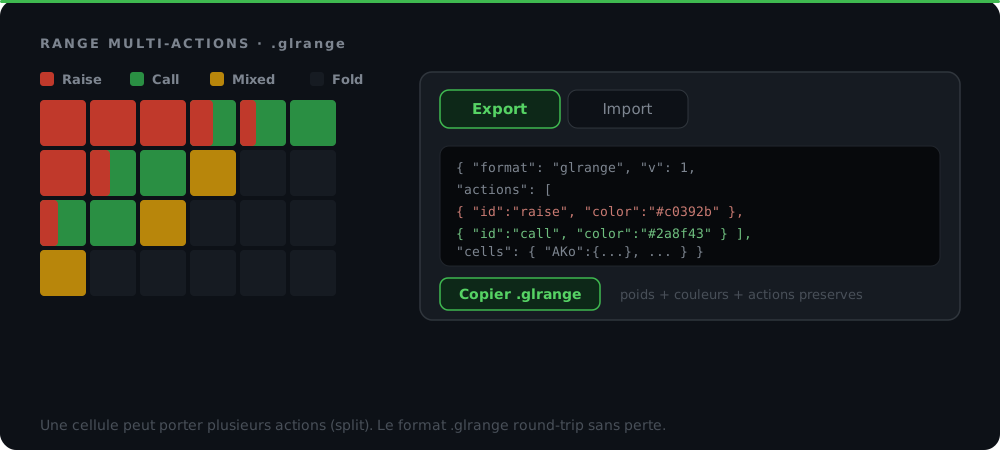
GrindLab's .glrange format is different: it stores the full multi-action breakdown (raise + call + 3bet + fold all in one file) so you can roundtrip a complex GTO range without losing information. This article explains the format, when to use it, and how it compares to the standard text exports of other tools.
The problem: text exports flatten multi-action ranges
Open any modern solver and look at the strategy view. A hand like AKs might be:
- 60% raise
- 30% call
- 10% 3bet
The UI shows this as a split cell with three colors. The data exists internally. But when you click "Export range", what you get is a text file with one frequency per combo — typically the action you have selected. To capture the full mix, you'd have to export three separate files.
This is fine for sharing a single decision (e.g. "what's your CO open range?"). It falls apart when you want to share a complete strategy or back up your work. Information leaks at every export.
The .glrange format: lossless multi-action storage
.glrange is a JSON-based bundle format used by GrindLab to import and export ranges. Each range stores:
| Field | Description |
|---|---|
name | Range name (e.g. "CO Open 100bb") |
hands | List of hand notations (["AA", "AKs", "22"]) |
weights | Per-hand weight (0–1) for partial frequencies |
actions | Per-hand action assignment (legacy, single dominant action) |
actionFreqs | Per-hand multi-action frequencies — { "AKs": { "raise": 0.6, "call": 0.4 } } |
actionDefs | Custom action palette (color, name, opacity) |
notes | Free-text notes attached to the range |
folderId | Folder structure for organizing ranges |
The actionFreqs field is the key. It mirrors how solvers store their internal data — frequency per action per hand. Roundtripping a range through .glrange preserves the full mix.
A bundle can also contain multiple ranges plus the folder hierarchy that organizes them. So you can ship an entire "MTT 100bb" study pack in a single file.
Multi-action vs single-action: a side-by-side
| Source | Format | Multi-action support | Roundtrip lossless |
|---|---|---|---|
| GrindLab .glrange | JSON bundle | ✅ via actionFreqs | ✅ Yes |
| Hand2Note export | CSV | ❌ One file per action | ❌ |
| GTO Wizard export | CSV / Text | ❌ One file per action | ❌ |
| Flopzilla range string | Text notation | ❌ Single action | ❌ |
| Equilab range string | Text notation | ❌ Single action | ❌ |
| PokerStars range syntax | Text notation | ❌ Single action | ❌ |
To be clear: every tool above supports multi-action ranges internally. Their UIs render the splits properly. The limitation is in their text export format — it's a lossy interchange layer designed for compatibility, not fidelity.
How GrindLab handles imports from other tools
GrindLab's import flow accepts both formats and auto-detects which you're pasting. The single-action limitation of the source format becomes a per-import constraint:
1. From the proprietary .glrange (full multi-action)
Drop a .glrange file in the Import modal → '.glrange' tab. The bundle is parsed, all multi-action metadata is preserved, ranges land in your library exactly as the sender built them.
2. From a solver text export (single action)
Drop a .txt, .csv, or .zip in the 'From solver' tab. GrindLab auto-detects the format:
- Combo-level (
AhKs:0.5, KdQs:1) — Hand2Note / GTO Wizard style - Hand-level (
99+, A2s+, [50]TT[/50]) — Flopzilla / Equilab style
Each file becomes one range. You pick the action it represents (Raise / Call / 3Bet / etc.) and the imported range goes into your library tagged with that action. To recover a full multi-action mix, import each action separately and combine them in the Editor.
3. ZIP support
Drop a .zip containing multiple range files. GrindLab expands it inline (one slot per file), filters out OS metadata (__MACOSX/, ._*, .DS_Store), and lets you configure each range's name + action in a single batch.
The case for the proprietary format
.glrange is proprietary, which has obvious tradeoffs:
Pros
- Preserves multi-action data losslessly
- Carries notes, folder structure, custom action palettes
- Compact (entire study packs in <1 MB)
- Versioned format with validation — won't silently corrupt
- Single file = easy to email/Slack/Discord
Cons
- Only GrindLab can read it directly
- For sending a range to a non-GrindLab user, you have to export each action as a separate text file
The proprietary format is the right tool when you control both ends of the pipe (your own backup, sharing with another GrindLab user, coaching deliveries). The single-action text formats are the right tool when you need to feed a range into a different ecosystem.
Use cases by workflow
"I'm building my study library from scratch"
→ Use .glrange exclusively for backups. Build ranges in the Editor with full multi-action assignments. Export periodically as a backup. Never lose data on browser cache wipe.
"I'm coaching students"
→ Build the range pack in GrindLab → export .glrange → students import it. They get the exact same ranges with your annotations, action assignments, folder organization. No interpretation lost.
"I'm migrating from Flopzilla/Equilab"
→ Use the Import → 'From solver' tab. Paste your existing range strings (99+, A2s+, KJo+, etc.). They become single-action ranges in GrindLab. Re-tag actions if needed. → Read the GrindLab vs Flopzilla comparison for migration tips.
"I'm using GTO Wizard solutions in my prep"
→ Export the relevant action from GTO Wizard → drop the file in GrindLab. Repeat for each action you need. Combine in the Editor for a multi-action master range. → See GrindLab vs GTO Wizard for the full integration story.
"I want to share a range pack with my study group"
→ Bundle the ranges into a folder → Export → send the .glrange file. Everyone imports it the same way. No format negotiation needed.
Inside the .glrange file: what it actually contains
A .glrange file is just JSON. You can open it in any text editor. Roughly:
{
  "format": "grindlab.range.bundle",
  "version": 1,
  "exportedAt": "2026-05-03T12:00:00Z",
  "exportedBy": { "app": "GrindLab", "appVersion": "1.0" },
  "ranges": [
    {
      "name": "CO Open 100bb",
      "hands": ["AA", "AKs", "AKo", "..."],
      "weights": { "AKo": 0.5 },
      "actionFreqs": { "AKs": { "raise": 0.6, "call": 0.4 } },
      "actionDefs": [
        { "id": "raise", "name": "Raise", "color": "#3FB950" },
        { "id": "call",  "name": "Call",  "color": "#58A6FF" }
      ],
      "notes": "MP open vs LJ flat call: raise weak suited Ax."
    }
  ],
  "folders": [{ "id": "...", "name": "MTT 100bb", "parentId": null }]
}
The format is documented and validated server-side. Future versions will be backward-compatible — bundles you export today will still import in a year.
Limits to be aware of
- Hold'em only. The format is designed for 2-card holdings on a 13×13 grid. PLO (4-card) is on the roadmap but not yet supported.
- Bundle size cap: ~10 MB to keep the API fast. A typical study pack is well under 1 MB.
- No live state:
.glrangeonly stores ranges, not equity calculations or in-progress hand analysis. Those live in their own data model.
What to use when
| Goal | Format |
|---|---|
| Back up your library | .glrange |
| Share with another GrindLab user | .glrange |
| Send to a non-GrindLab tool | Export each action as solver text |
| Import from Flopzilla/Equilab | 'From solver' tab → hand-level format |
| Import from GTO Wizard/Hand2Note | 'From solver' tab → combo-level format |
| Bulk import a study pack from ZIP | 'From solver' tab → drop the ZIP |
Summary
The .glrange format exists because no standard text export captures multi-action frequencies. By making the format proprietary and JSON-based, GrindLab can preserve the full strategy mix per range — including notes, folder structure, and custom action palettes — in a single file.
For exchange with other ecosystems, the import flow accepts the standard combo-level and hand-level text formats used by Hand2Note, GTO Wizard, Flopzilla and Equilab. Each imported range is single-action by design (the source format's limitation), but you can layer multiple imports in the Editor to reconstruct a multi-action master range.
The proprietary format is the right tool when fidelity matters. The text formats are the right tool when interoperability matters. Both have their place.
→ Read the complete GrindLab guide for an overview of the rest of the toolkit, or check how to build poker ranges for the strategy side.
The method in 5 steps
Build your range with multiple actions in GrindLab
In the Range Editor, use Custom Actions (Raise, Call, 3Bet, etc.) and assign hands to each. The actionFreqs system stores frequency per action per hand — same data shape as solver outputs.
Export to .glrange
Click Export in the Range Manager toolbar. Pick which ranges to bundle. The file downloads with the .glrange extension. All multi-action data, weights, and notes are preserved.
Import to another GrindLab account
Click Import → '.glrange' tab → drop the file. Choose the destination folder. Conflicts auto-resolve with a numeric suffix. The recipient gets the exact same ranges with all multi-action metadata intact.
Import from a solver (single-action)
Click Import → 'From solver' tab → drop one or more .txt/.csv files (or a ZIP). Each file becomes a slot in a table. Pick the action for each range, then Import all.
Combine multiple solver exports into one multi-action range
Workflow: export 'raise' from GTO Wizard → import as Range A action 'Raise'. Export 'call' → import as Range B action 'Call'. Manually merge in the Range Editor by combining the action assignments.