
The Complete Guide to GrindLab: How to Use Every Feature to Exploit Your Opponents
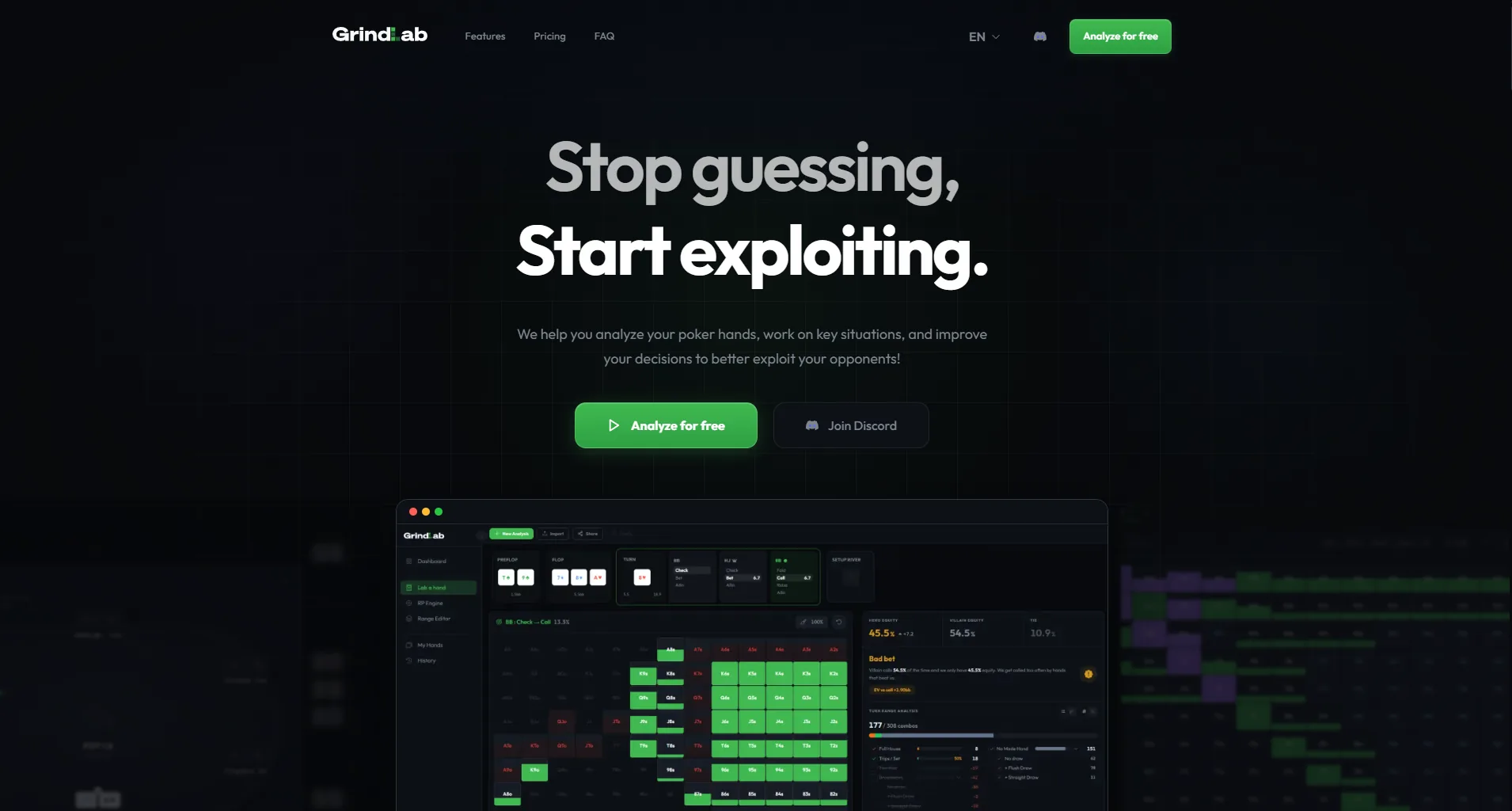
GrindLab is a browser-based poker study tool built for one purpose: helping you exploit real opponents. No downloads, no complex setup. Open your browser, sign in with Google or Discord, and you're in.
This guide walks you through every feature of GrindLab, step by step. Whether you just signed up or you've been using GrindLab for weeks, you'll find practical workflows to get the most out of each tool.
Looking for the detailed documentation? This article is the condensed version, readable in one sitting. The full version, chapter by chapter, lives in the GrindLab Guide.
What Is GrindLab?
GrindLab is not a solver. It doesn't tell you the Game Theory Optimal play. Instead, it helps you answer a more profitable question: what should I do against THIS opponent, with THESE tendencies, in THIS spot?
The tool is built around a few complementary features:
- Lab a hand : calculate your equity vs any villain range, street by street, with a verdict, filters, and hand replay
- Ranges : build, organize, and save your ranges in the visual 13×13 editor, for every spot and player profile
- My Hands : import, filter, replay, and share your hand histories from any room, then send them into the Lab in one click
- History : every analysis is auto-saved so you can revisit and learn from past sessions
GrindLab runs 100% in the browser on any device: desktop, tablet, or phone. Chrome, Safari, Firefox, Edge, all supported. Your data syncs across devices automatically.
Getting Started
Signing Up
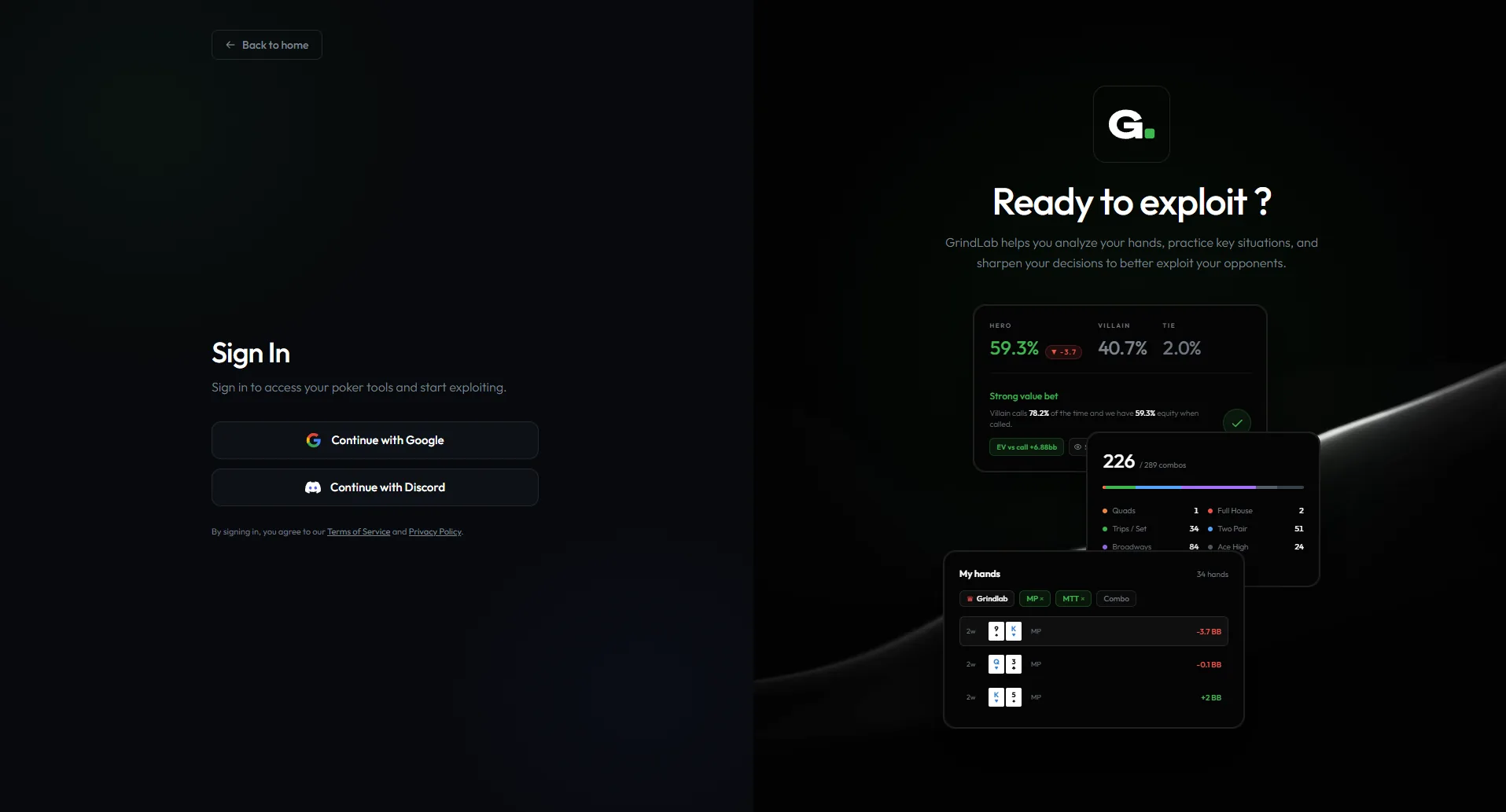
Go to grindlab.gg and click "Start for free." You can sign in instantly with your Google account or your Discord account. No email/password forms, no verification emails, you're inside the tool in seconds.
The Free plan lets you start with no credit card: every day, the Hand of the Day unlocks all Grinder features on a full spot, and you keep access to preflop/flop equity. The Grinder plan then unlocks the whole tool.
Navigating the Interface
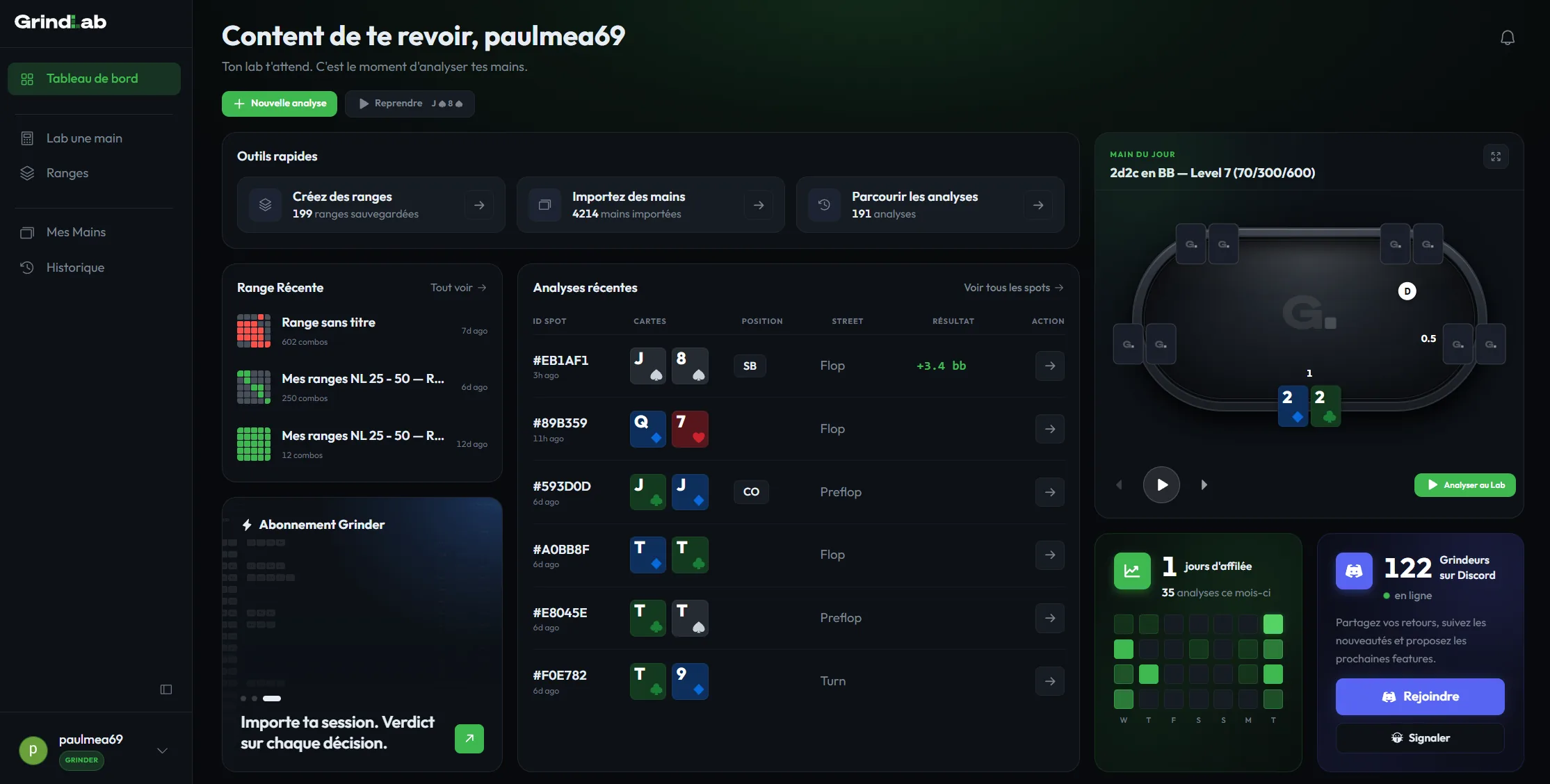
Once logged in, you'll see the main navigation with access to each tool:
- Dashboard : your starting point, with the Hand of the Day, plus your recent ranges and analyses
- Lab a hand : the Lab for analyzing a hand, street by street
- Ranges : the editor for building and organizing your ranges
- My Hands : your imported hand histories (Grinder feature)
- History : your saved analyses
Each tool is a standalone page. You can jump between them at any time without losing your work.
Feature 1: The Lab ("Lab a hand")
This is the core of GrindLab. The Lab lets you analyze any poker hand, street by street, from preflop to river.
How It Works
GrindLab uses Monte Carlo simulation: it runs thousands of random board runouts to calculate your equity against the range you assign to the villain. The more specific you make the villain's range, the more accurate your analysis becomes.
Step-by-Step: Analyzing a Hand
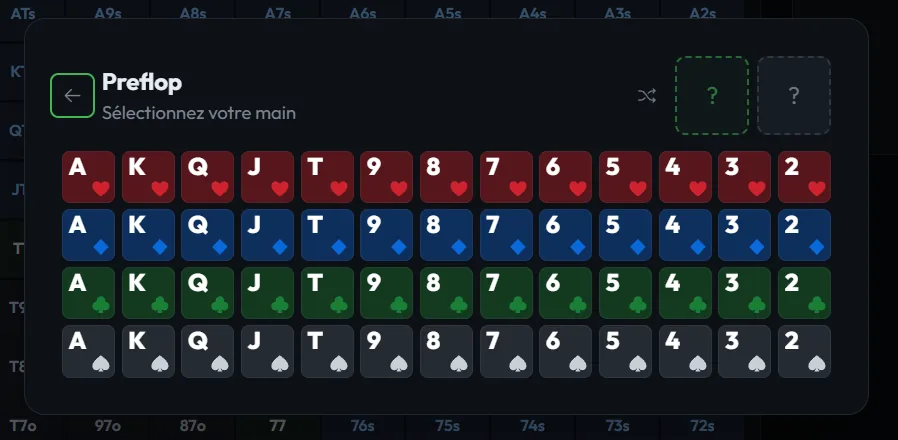
Step 1: Enter your hole cards. Select your two cards from the card picker. For example, A♠ J♥.
Step 2: Set the board. If you're analyzing a post-flop spot, enter the community cards. You can enter the flop only, flop + turn, or the full board through the river.

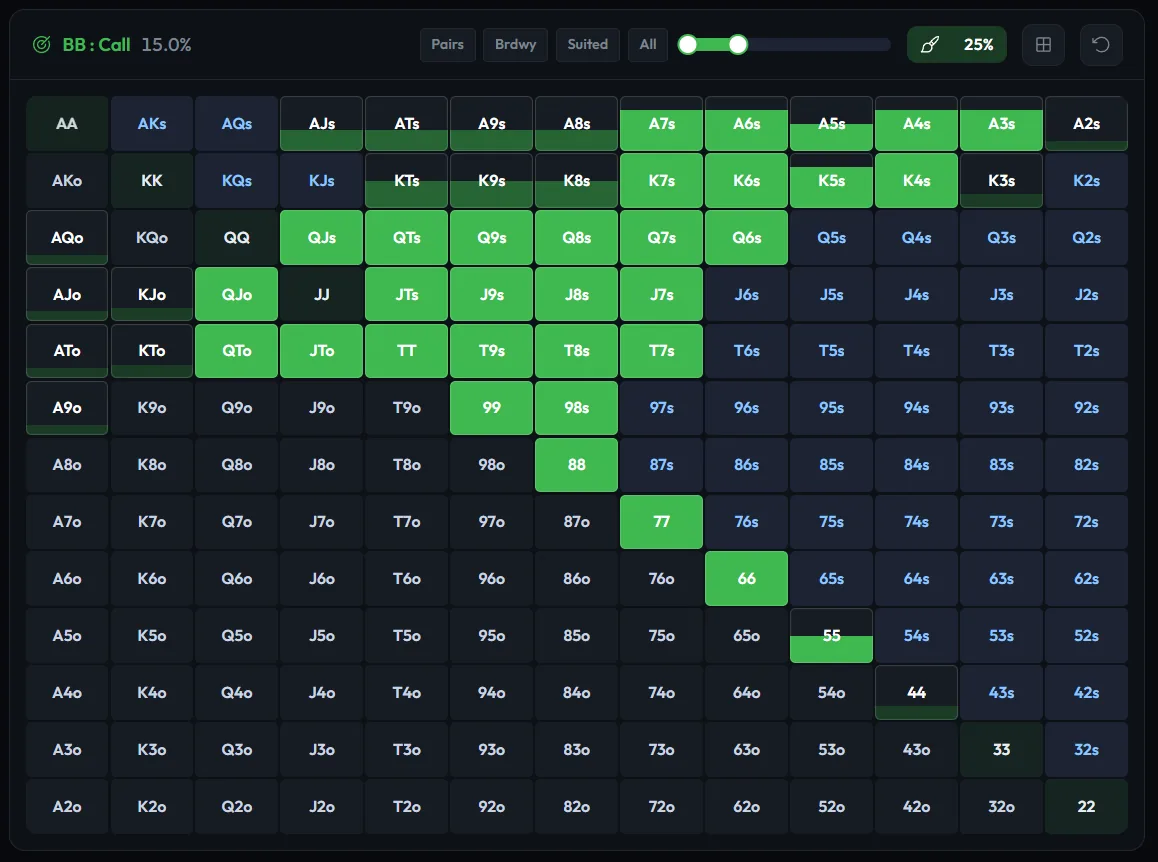
Step 3: Assign the villain's range. This is where exploitation begins. Use the 13x13 hand matrix to select the hands you think the villain can have in this spot. You can:
- Click individual hands to add or remove them
- Use preset ranges (tight, medium, wide) as a starting point
- Apply filters by hand category (pairs, suited connectors, broadway, etc.)
- Adjust combo weights if you think the villain has certain hands at reduced frequency
Step 4: Enter the action. Specify what the villain did, for example "Villain bets 15 into 100" (a 15% pot bet). GrindLab will calculate:
- Your equity : your chance of winning at showdown vs this range
- Pot odds : what equity you need to call profitably
- MDF (Minimum Defense Frequency) : how often you need to defend to prevent villain from profiting with any two cards
- Equity vs callers : your equity specifically against the portion of villain's range that would call your raise
Step 5: Read the verdict. GrindLab gives you a clear, plain-English recommendation. For example: "18.6% equity vs 13.0% needed. Calling is profitable." No ambiguity.
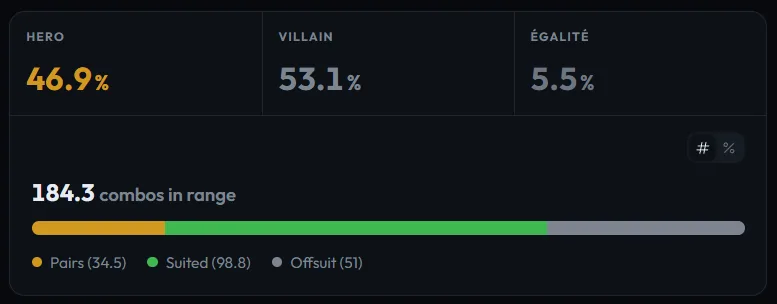
Step 6: Advance to the next street. Add the turn card and repeat. Then the river. GrindLab tracks your equity progression across every street, so you can see how your situation evolved.

Calculate hand equity, pot odds, and compare ranges with GrindLab's free equity engine
Try it free →The Range Composition Bar
Below the equity calculation, the composition bar breaks down the villain's range by hand category. You'll see exactly what percentage of their range falls into each bucket:
Strong hands: quads, full houses, flushes, straights, sets/trips, two pair, overpairs, top pair.
Weak hands: middle pair, bottom pair, weak pair, ace high, king high, no made hand.
Draws: flush draws, open-ended straight draws, gutshots, backdoor flush draws.
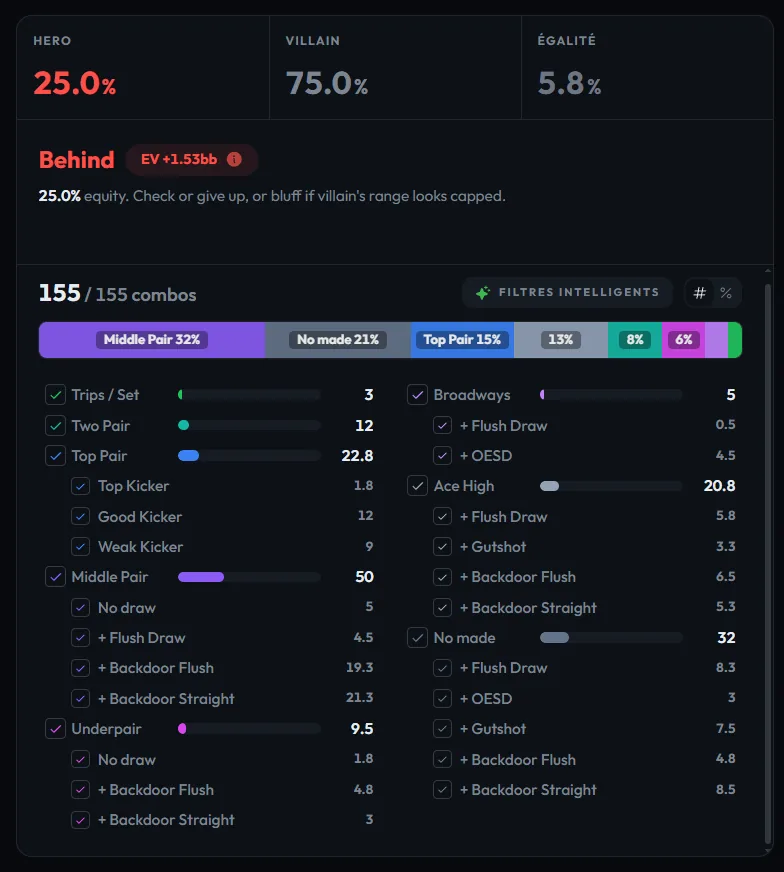
A toggle lets you switch between the detailed category view and a more synthetic macro view (Value / Showdown / Air) to grasp the range's structure at a glance.
To move faster, Smart Filter (a Grinder feature) suggests one-click postflop range selections (for example, keeping only the hands that would continue against your bet), right on the matrix.
This breakdown is what makes exploitation possible. If you see that 69% of villain's range is weak hands on the flop, that tells you a bet will generate significant fold equity. If villain's range is 40% strong hands, maybe checking is better.
Hand Import (Auto-Import)
Don't want to enter everything manually? Paste a hand history from any major poker room (PokerStars, GGPoker, Winamax, Unibet, PMU, Betclic, etc.) directly into GrindLab. The tool automatically parses:
- Your hole cards
- The board cards
- Positions
- Stack sizes
- Betting actions
One paste, and you're ready to analyze. Importing your own histories is a Grinder feature.
Hand Replay
Once the hand is loaded, you can replay it street by street in the Lab: board, actions, sizings, stacks, and positions play out just like at the table. It's perfect for reconstructing how a hand unfolded before you lock in the villain's range and read the verdict.
Tips for Better Equity Analysis
- Be honest with villain ranges. The analysis is only as good as the range you assign. If you give villain too tight a range, you'll overestimate your equity. Too wide, and you'll underestimate it.
- Narrow the range street by street. Start with villain's preflop range, then remove hands that wouldn't take their actual line on each street.
- Use the composition bar. Don't just look at the equity percentage, look at what the villain's range is made of.
Feature 2: Ranges (the range editor)
Ranges let you build, save, and organize custom ranges for every spot in your game.
Why Build Custom Ranges?
Most players have a vague idea of what they open from each position or how they respond to 3-bets. The range editor forces you to make those decisions explicitly, save them, and practice them.
How It Works
The 13x13 matrix. Every Texas Hold'em starting hand is represented in a grid. Pairs run diagonally, suited hands above the diagonal, offsuit hands below.
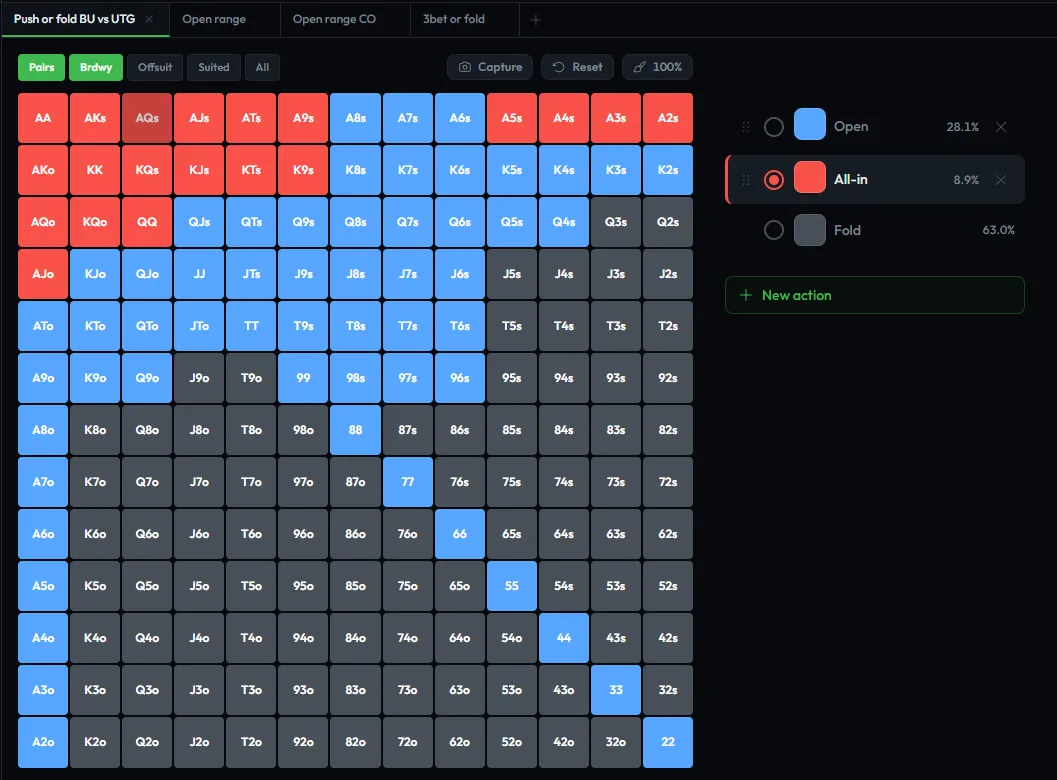
Building a range:
- Select the hands you want to include by clicking them on the matrix. Selected hands are highlighted.
- Assign weights if needed, for example you might open A5s 100% of the time from the button but only 50% from the hijack.
- Tag the range with metadata: position (BTN, CO, SB, BB, UTG...), situation (open, vs 3-bet, vs limp...), stack depth (25bb, 50bb, 100bb...), and game type (MTT, cash, SNG).
Organizing your library: Ranges are saved in your library, organized by game type (MTT, Cash, SNG) and position: you can see at a glance how many ranges you've built for each spot (for example several open and vs-3-bet defending ranges for the button, at different stack depths).
Player profiles: You can assign ranges to player profiles: nit, reg, fish, or custom labels. This is useful when you want to model different types of opponents in the Lab.
You can work with several ranges side by side using tabs, and import or export your ranges (JSON, CSV). The Free plan lets you create up to 5 ranges; the Grinder plan makes them unlimited.
Tips for the Range Editor
- Start with your most common spots. Don't try to build 50 ranges on day one. Start with your open-raise ranges for each position at your most played stack depth.
- Review and update. Your ranges should evolve as your understanding improves. Revisit them monthly.
- Use profiles for opponents. Build a "typical fish" range and a "tight reg" range. Use those profiles in the Lab for faster analysis.
- Export what you build. Ranges save to a multi-action range format that keeps one range per action rather than flattening it to a single selection.
Feature 3: My Hands
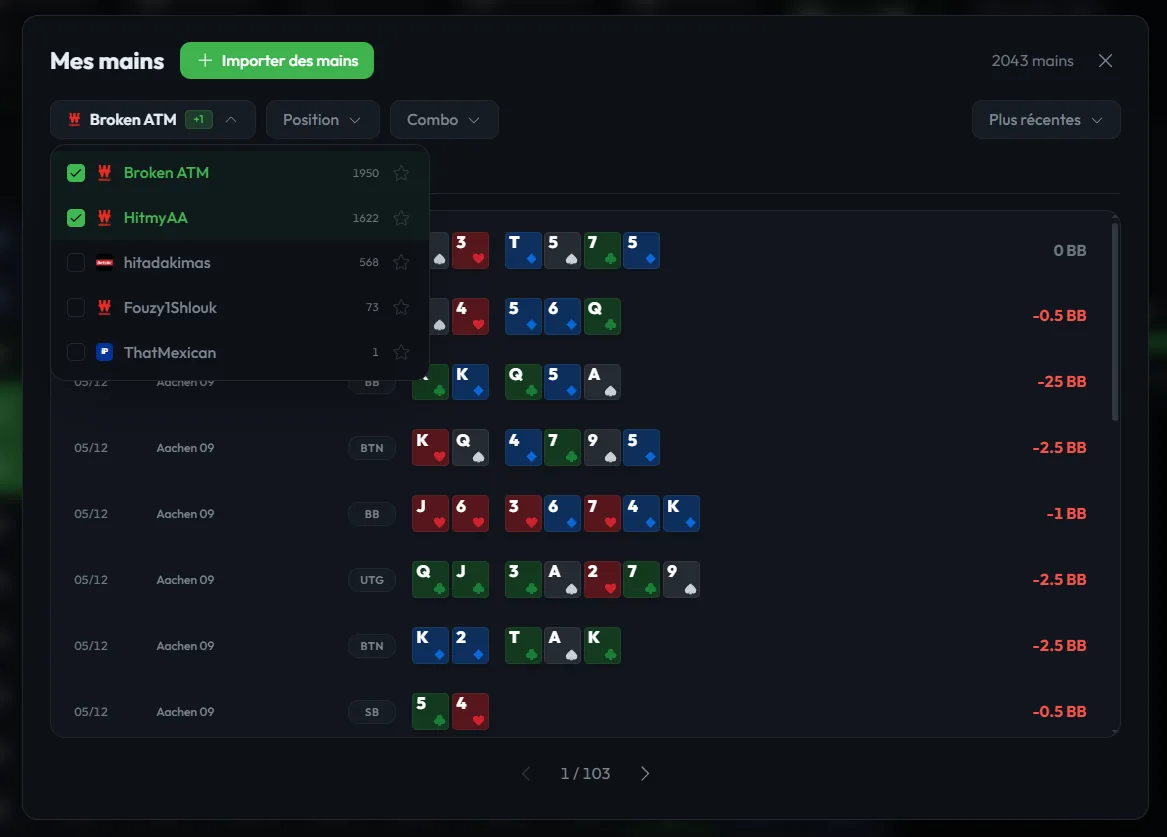
"My Hands" is your library of imported hand histories. Where the Lab analyzes one hand at a time, My Hands centralizes every hand you've played so you can find, filter, replay, and share it. It's a Grinder feature.
What You Can Do
- Bulk-import your histories from Winamax, PokerStars, GGPoker, Unibet, PMU, Betclic, and other major rooms.
- Filter by room, game type (cash, MTT), positions, blind level, or result.
- Analyze in the Lab in one click: the hand is pre-filled (board, actions, stacks, positions), ready to study.
- Villain stats: VPIP / PFR / 3-bet to put their tendencies in context.
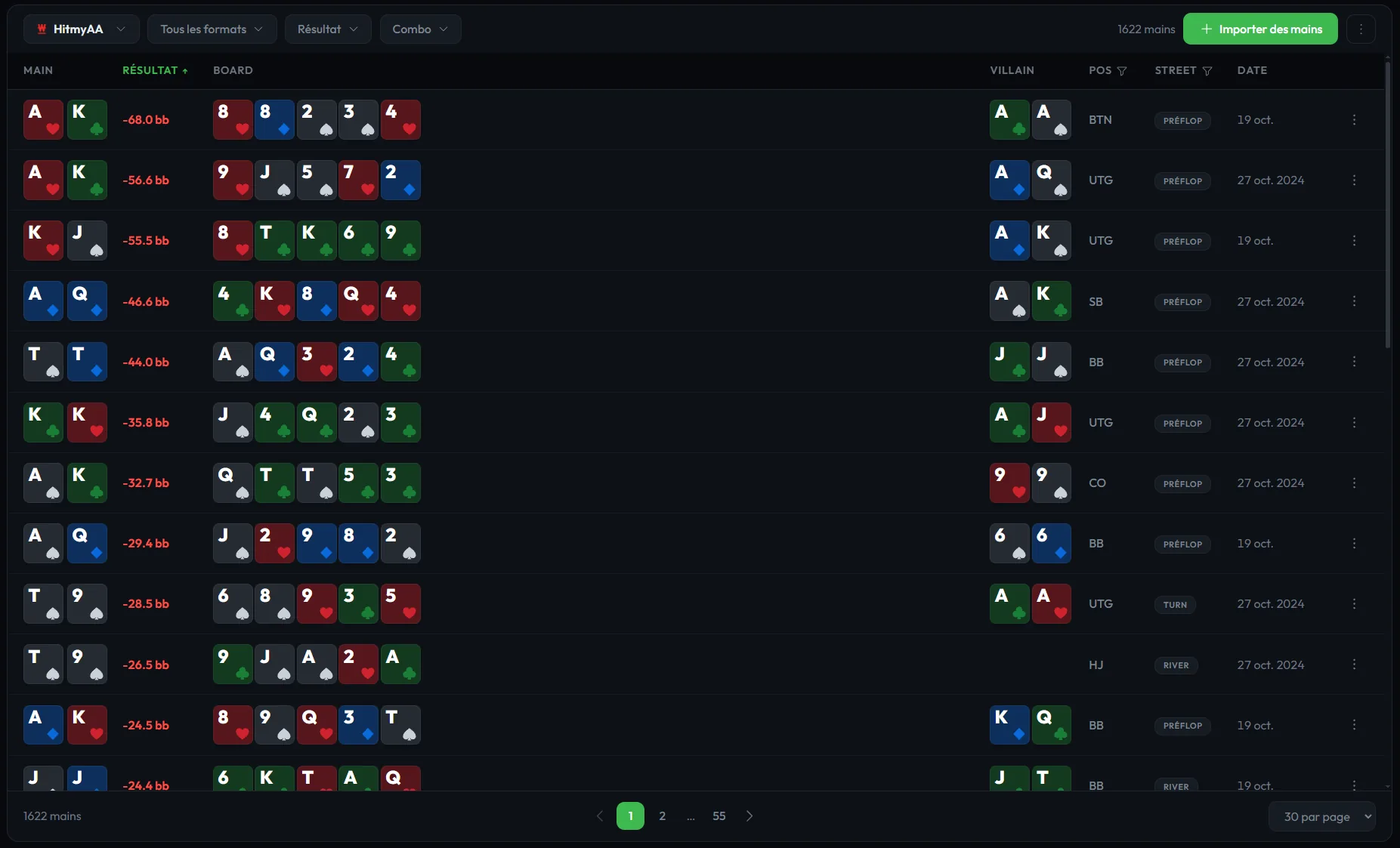
Replay and Share Your Sessions
This is the heart of My Hands. You can replay a full cash session or tournament, hand by hand, exactly like at the table. And, crucially, you can share an entire session via a unique link: a set of hands, or a whole tournament, that your coach or study group opens straight in the replayer, with nothing to install.
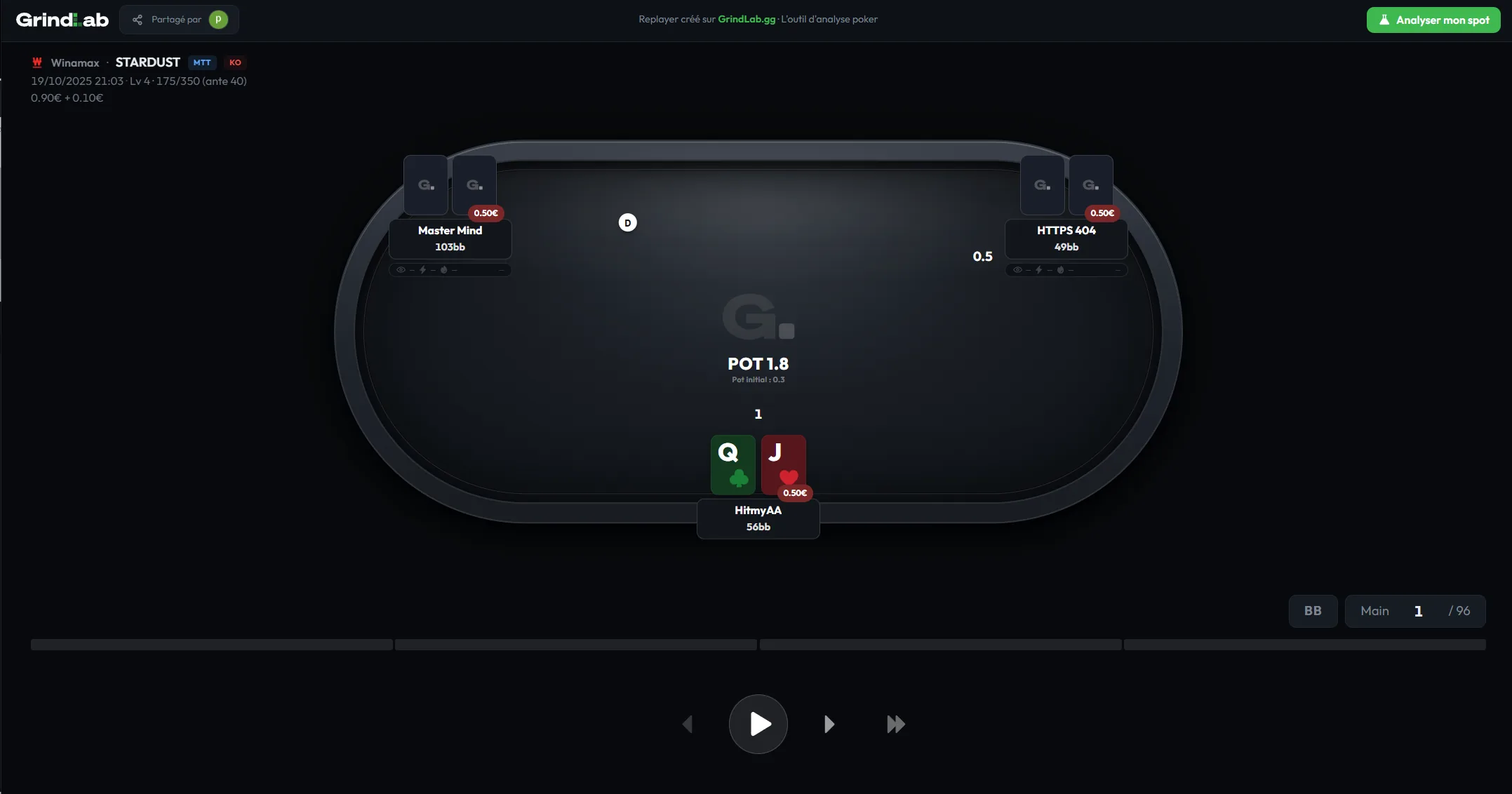
It's the ideal coaching tool: your coach reviews a whole session with you, and any hand from the replay opens in the Lab in one click for a deep dive.
The Free plan keeps access to the Hand of the Day; the Grinder plan unlocks your entire hand library, session replays, and sharing.
Feature 4: History
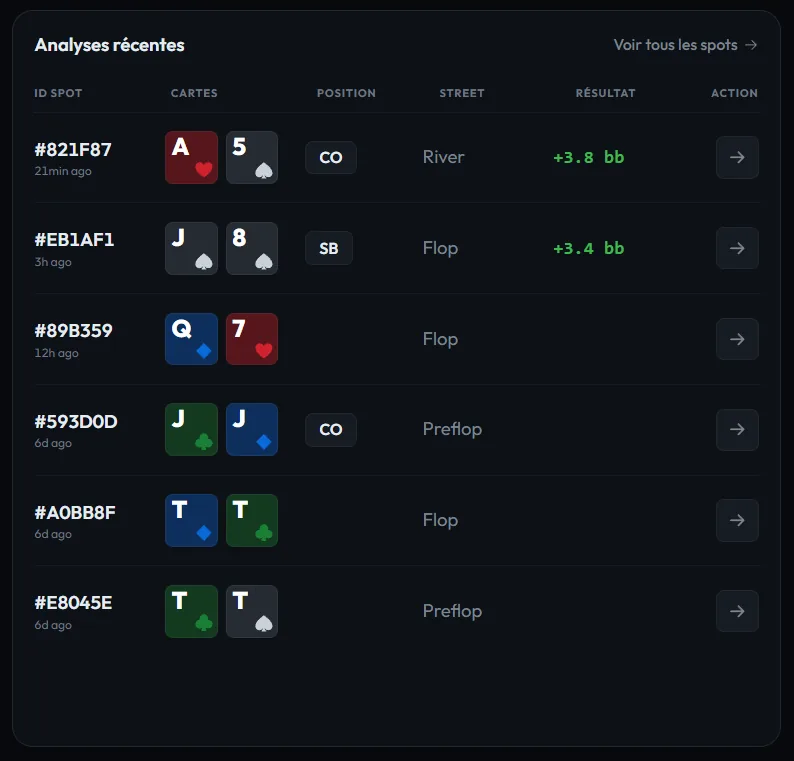
Every analysis you run in the Lab is automatically saved to your History. No manual saving required.
What's Saved
Each entry in your History includes:
- Your hole cards and the board
- The street you analyzed
- The villain range you assigned
- The equity result
- The date and time
- Any notes or tags you added
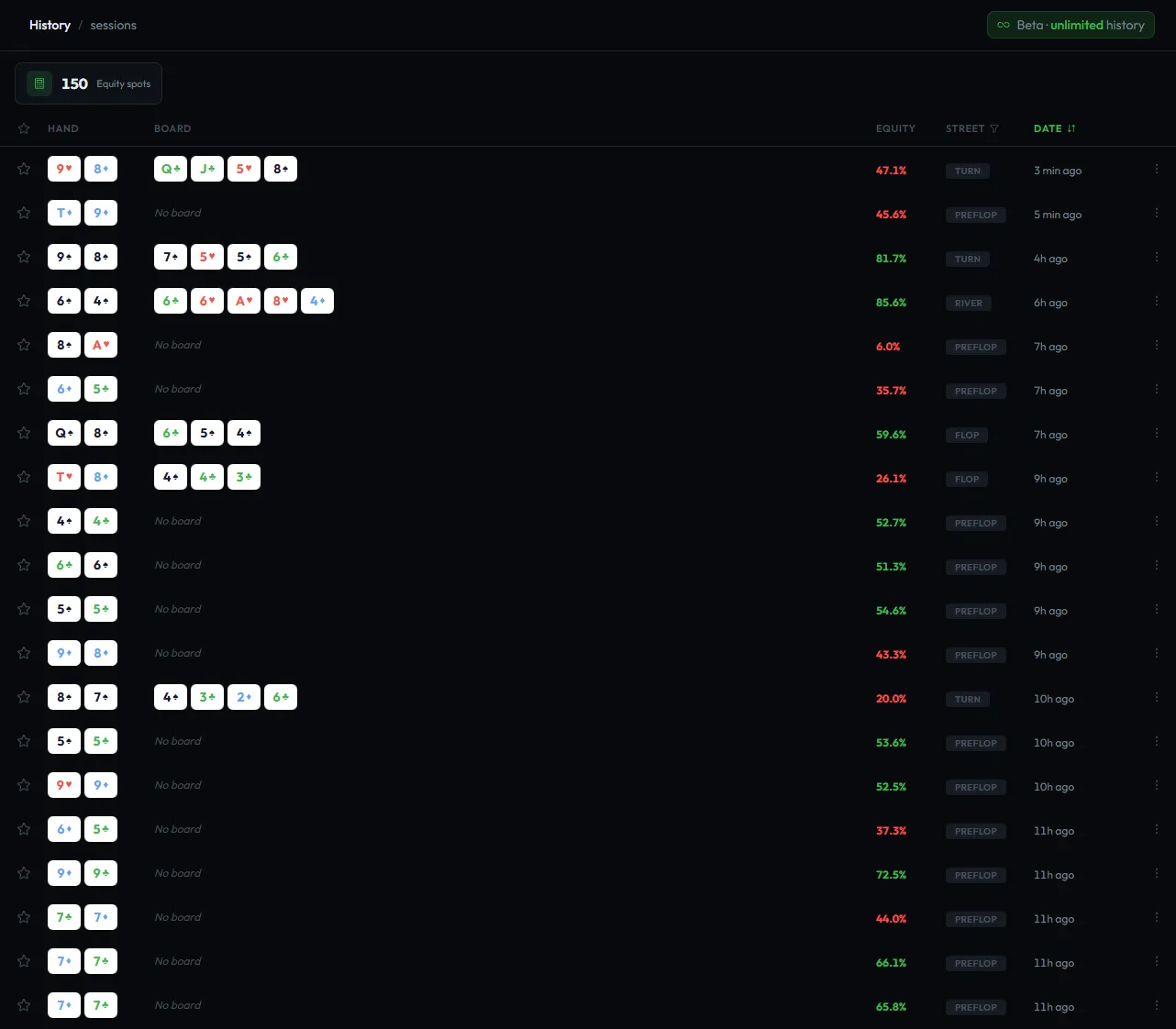
How to Use History Effectively
Post-session review: After a poker session, open your History and look at the hands you analyzed. Do you see patterns? Are you consistently overestimating your equity in certain spots?
Tags and favorites: Tag your analyses with labels like "value," "bluff," "leak," or "spot," and star your important hands. Filter by tag or favorite later to review specific types of hands. The Free plan keeps the 6 most recent spots clickable; the Grinder plan unlocks your full history.
Track your volume: History shows how many spots you've analyzed over time. Studying 5 hands per day adds up to 150 per month: that's 150 spots where you now have a data-backed answer instead of a guess.
Sharing Your Analyses
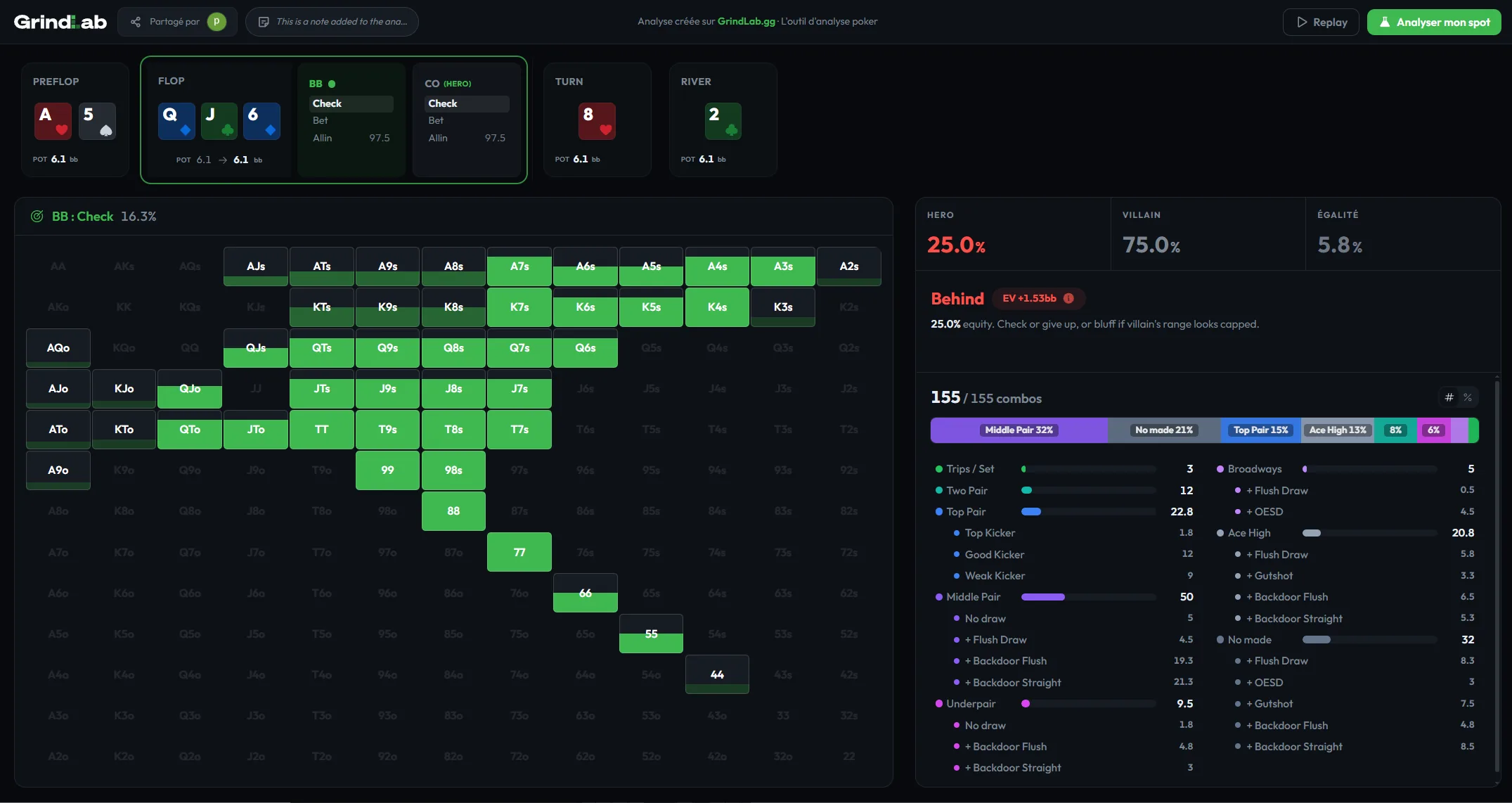
GrindLab lets you share any hand analysis via a unique link. When someone clicks it, they see your complete analysis on a dedicated page: the hand, the board, the villain range, the equity, and your notes.
From that shared page, the viewer can create their own analysis, which brings them into GrindLab. This is a great way to discuss hands with your study group or poker friends. If you would rather not expose the player names, you can share a hand anonymously.
Practical Workflows
Workflow 1: Post-Session Hand Review (15-20 minutes)
This is the highest-value habit you can build as a poker player.
- After your session, pick 3-5 hands where you felt unsure about your decision.
- Open the Lab. Enter the hand (or paste the hand history).
- Assign the villain's range based on what you observed: their position, their player type, their actions on each street.
- Check the equity. Was your call/fold/raise correct?
- Look at the range breakdown. Did villain's range have more strong hands than you expected? More draws?
- Add a note to the analysis.
- Save and move to the next hand.
Workflow 2: Weekly Range Review (30 minutes)
- Open Ranges.
- Pick one position per week to audit.
- Look at your range: are there hands you've been opening that you shouldn't? Hands you should add?
- Cross-reference with your History: if you keep losing with a specific hand in a specific spot, maybe it shouldn't be in your range.
- Update the range accordingly.
Workflow 3: Study Group Hand Sharing
- Analyze a hand you found interesting or where you're unsure of the correct play.
- Share the analysis link with your study group or poker friends.
- Each person opens the link, sees your analysis, and can create their own version with a different villain range or interpretation.
- Compare results and discuss: did your range assumptions lead to the same conclusion?
Tips and Tricks
Mobile use. GrindLab works on mobile, which means you can review hands on the go: during your commute, between tournament breaks, wherever.
Start small. You don't need to use every feature on day one. Start with the Lab. Analyze 2-3 hands after your next session. Once that becomes a habit, start building your ranges in Ranges. Layer by layer.
Join the Discord. The GrindLab Discord is where the community discusses hands, shares feedback, and votes on upcoming features. It's also where you'll get the fastest answers to any questions.
Use hand import. Copying and pasting a hand history is dramatically faster than entering everything manually. Get in the habit of exporting your interesting hands from your poker client and pasting them directly into GrindLab.
What's Coming Next
GrindLab is in active development. The Grinder plan is now available: the Free plan stays free, and Grinder unlocks the whole tool. Here's what's on the roadmap:
- Crusher & beyond: decision trees, advanced solvers, and niche tools for the most dedicated grinders.
The best way to stay updated and influence what gets built next is to join the GrindLab Discord. Feature requests from the community directly shape the product roadmap.
FAQ
Is GrindLab a GTO solver?
No. GrindLab is an exploitation tool. It doesn't calculate balanced GTO strategies. It helps you find the most profitable response against a specific opponent's range.
How does the equity calculation work?
Monte Carlo simulation. GrindLab runs thousands of random board runouts for your hand vs the villain range you defined, then calculates the win/tie/loss percentages.
Does GrindLab work on mobile?
Yes. It's 100% browser-based and works on Chrome, Safari, Firefox, and Edge (desktop, tablet, and phone).
Is it free?
Yes. You can use GrindLab for free on the Free plan, no credit card needed: the Hand of the Day unlocks all Grinder features on one spot every day, plus access to preflop/flop equity. When you're ready for the advanced features (verdict, sizing analysis, unlimited postflop simulations, hand import, and unlimited history), upgrade to the Grinder plan.
Can I import hand histories?
Yes. Paste a hand history from any major poker room and GrindLab auto-parses the cards, positions, and actions.
Is my data private?
Yes. Your ranges, analyses, and history are yours. GrindLab does not share your data with third parties.
What poker formats does GrindLab support?
The Lab works for any Texas Hold'em format: cash games, MTTs, SNGs, Spin & Gos.
Related Reading
- What Is GrindLab?: a quick overview of the tool and its philosophy
- Poker Equity Explained: the math behind the Lab
- How to Build Poker Ranges: practical range building guide
- How to Review Your Poker Sessions: use GrindLab for systematic session review
- How to Study Poker: build a daily study routine with GrindLab
The method in 6 steps
Enter your hole cards
Select your two cards from the card picker. For example, A♠ J♥.
Set the board
Enter the community cards for the street you want to analyze: flop only, flop + turn, or the full board through the river.
Assign the villain's range
Use the 13×13 hand matrix to select the hands you think the villain can have. Click individual hands, use presets, apply filters, or adjust combo weights.
Enter the action
Specify the villain's action, for example villain bets 15 into a pot of 100. GrindLab calculates your equity, pot odds, MDF, and equity vs callers.
Read the verdict
GrindLab gives you a clear recommendation. For example: 18.6% equity vs 13.0% needed. Calling is profitable.
Advance to the next street
Add the turn card and repeat. Then the river. GrindLab tracks your equity progression across every street.