
Organize your hand database: sessions, favourites and to-review
A few months into serious grinding, your hand database stops looking like a small stack you flip through. It starts looking like a warehouse: tens of thousands of imported hands, cash and tournament mixed together, and somewhere in the middle the three or four genuinely interesting spots you wanted to work on last week that you can no longer find.
The problem isn't having too much data, it's not having a structure to navigate it. GrindLab fixes this with a Database menu built for scale: a flat, fast list for browsing, a session-level aggregate for reviewing a whole table, and quick actions to flag what matters without ever leaving the list.
Two sections, two intents
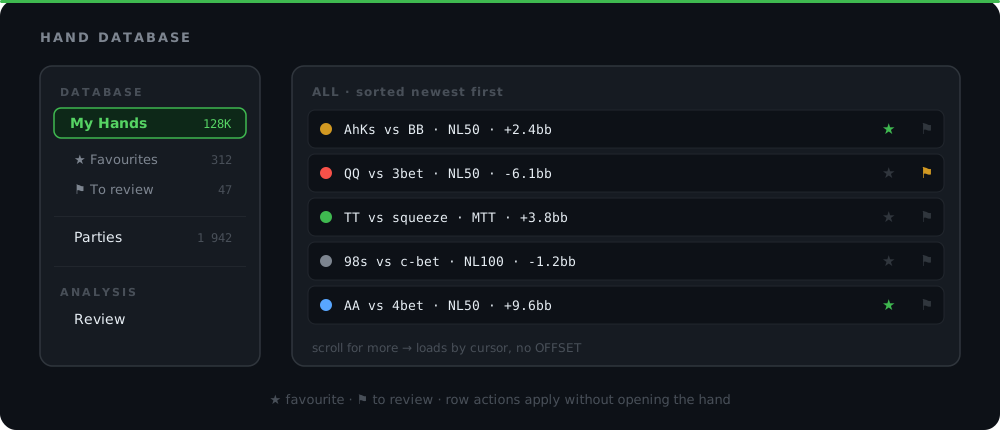
The left menu cleanly separates browsing from analysis. The DATABASE section groups My Hands (with its All, Favourites, To review sub-views) and Parties. The ANALYSIS section holds Review. This isn't cosmetic: it maps to two different tasks you do at different moments.
Browsing your database means searching, filtering, spotting. Analyzing a hand means slowing down, opening the Lab, replaying street by street, comparing your action to what you should have done. Mixing both into a single flat menu eventually creates a confusing list where you can't tell if you're looking for a hand or studying one. Splitting the two sections keeps every screen focused on a single intent.
And this structure isn't web-only: the GrindLab desktop tracker's menu follows the exact same logic. DATABASE on one side, ANALYSIS on the other, whether you're on the browser or the installed app. You switch devices, not landmarks.
That detail matters more than it looks if you go back and forth between the two: you spot a shaky hand mid-session on the desktop tracker, flag it to review in one click, then find it that same evening in My Hands on the web to open it in the Lab. The identical menu means you never lose your bearings switching devices.
My Hands: a flat list that never slows down
The old approach navigated by tabs, one tab per table or session, nested inside the hand list itself. That works for a hundred hands. It becomes unmanageable at a hundred thousand: too many tabs to scroll through, and finding one specific hand means guessing which session it lived in.
My Hands is now a flat, paginated list. Every imported hand, sorted, filterable, with no tab hierarchy nested inside. Three sub-views cover the essentials:
- All: your entire database, newest to oldest.
- Favourites: hands you flagged as worth a second look.
- To review: your study queue, hands you want to revisit but haven't opened yet.
Session-level browsing doesn't disappear, it moves to Parties, where it makes more sense than inside a list of individual hands. The result: My Hands stays a simple list to scan, no matter how big your database gets.
Parties: the aggregate that reconstructs your sessions
If My Hands answers "I'm looking for a hand", Parties answers "I want to review the whole 9pm table" or "I want to review yesterday's tournament session". It's the view built for browsing by session or table played, rather than hand by hand.
Under the hood, Parties never rereads your raw hands one by one to build itself: it reads a precomputed aggregate, and loads results via cursor-based infinite scroll rather than classic numbered pages. In practice, that means the page opens just as fast whether you've played 50 sessions or 5,000: response time doesn't depend on how large your history is.
It's the same logic that keeps tracking your sessions usable over the long run: without an aggregate, every page load would have to recount all your hands from scratch, getting slower month after month. With the aggregate, speed never moves.
Favourites and to-review: flag without opening the hand
The detail that actually changes your day-to-day is that these flags happen inline, right in the list. No need to open the hand, dig through a menu, and come back. Every row in the My Hands list carries two quick actions:
| Action | Icon | Effect |
|---|---|---|
| Favourite | star | The hand shows up in the Favourites sub-view, ready to find quickly later |
| To review | flag | The hand joins your study queue in the To review sub-view |
This kind of detail looks minor until you're grinding seriously. Mid-session, you don't have ten seconds to spend on a hand that looks off: you click the icon, you keep playing, and you find the hand later in "To review" once you actually have time to think. It's the same principle as tagging hands: classify the moment you notice something, not three days later when you've forgotten everything.
Read your session and your curves
Review: analysis lives in its own section
Once a hand is marked to review (or simply spotted in Parties), the next step is opening it in Review, under the ANALYSIS section of the menu. That's deliberate separation from the database: Review is where you slow down, where you review your sessions street by street, where you compare your actual line to what the Lab suggests.
This split avoids a classic tracking trap: confusing "I stored the hand somewhere" with "I understood why the hand went wrong". The database files things away, Review analyzes. Two screens, two steps of the same process.
Build your poker instincts. Practice equity and pot odds decisions in real time
Try it free →Why this matters at scale: no scans, ever
Here's the real point behind this restructuring: a hand database that grows without limit eventually slows down if the architecture behind it wasn't built for that. Most trackers visibly degrade past a few hundred thousand hands, because every screen rereads raw hands to build itself.
GrindLab avoids that trap with two principles applied consistently:
- Cursor pagination, never OFFSET. My Hands and Parties load results page by page via a cursor (infinite scroll), not via a numeric offset that gets slower and slower the deeper you go into your history.
- Bounded lists, no full scans. No view rereads your entire database to render. Aggregated views (like Parties) read precomputed aggregates, not hands one by one.
The concrete result: whether you imported 10,000 hands through hand import or several million over the years, opening My Hands takes the same time. Filtering by To review takes the same time. Scrolling deep into Parties' history takes the same time. The database never becomes dead weight.
It's a constraint a lot of tools ignore early on, because it doesn't show while the database is still small. A brand-new account with 500 hands is fast no matter what's underneath. The real test comes after months of steady grinding, when every screen has to stay just as responsive at 2 million hands as it was at 2,000. That's the constraint that drove this menu redesign: better to build a structure that scales from day one than to retrofit one in a panic once lists start crawling.
A two-minute sorting routine after every session
Structure is worthless without a habit behind it. Here's the simplest one to adopt: spend two minutes in My Hands at the end of every session, before you close the app.
- Filter on All, sorted newest first. Today's session hands are right at the top.
- Scan quickly. For every hand that makes you pause (a big loss, a hesitant decision, an unusual spot), click the flag icon to send it to To review.
- Star the clean ones. Hands where you played well and want to keep as a reference, or ones you want to show a coach or share in a study group.
- Leave the rest alone. No need to sort hand by hand: most hands have nothing to teach, and that's fine.
Two minutes per session, and your To review queue stays fed continuously instead of piling up into ten thousand unsorted hands by Sunday night. It's the same philosophy as tagging hands: sort as you go, not in one dreaded batch afterward.
An organized database, an analysis that follows
A well-organized hand database isn't a comfort detail, it's what determines whether you actually review your hands or whether they just pile up unstudied. The My Hands / Parties / Review triptych gives each step its own screen: browse fast, find a session, analyze in depth.
Three habits to build:
- Flag while you play, not after the fact. Star or flag in one click from the list, while you're still in session.
- Use Parties for table context, My Hands for precise search. These aren't the same questions, and they aren't the same screens.
- Leave Review for the real analysis work. The database files things away, the Lab and Review are where you understand.
Open My Hands, filter by To review, and clear the queue one hand at a time. That's often where the easiest leaks hide.