
Import Your Session into GrindLab: 6 Rooms, Auto-Detect, Full Workflow
Analysing theoretical spots is useful. Analysing your own hands in real spots is what makes you improve. Problem: every room has its own hand history format, its quirks (€ prefix, Unibet hash suffix, hero name anonymised in PokerStars HUDs, etc.), and exporting + converting manually takes more time than studying.
GrindLab natively imports hand histories from 6 major rooms: Winamax, Unibet, PokerStars, Betclic, GGPoker, PMU. Format auto-detection, cash + MTT + PKO support, ZIP upload, clean anonymisation. This article covers the full workflow from room export to EV verdict in the Lab, and details each parser's quirks for edge cases.
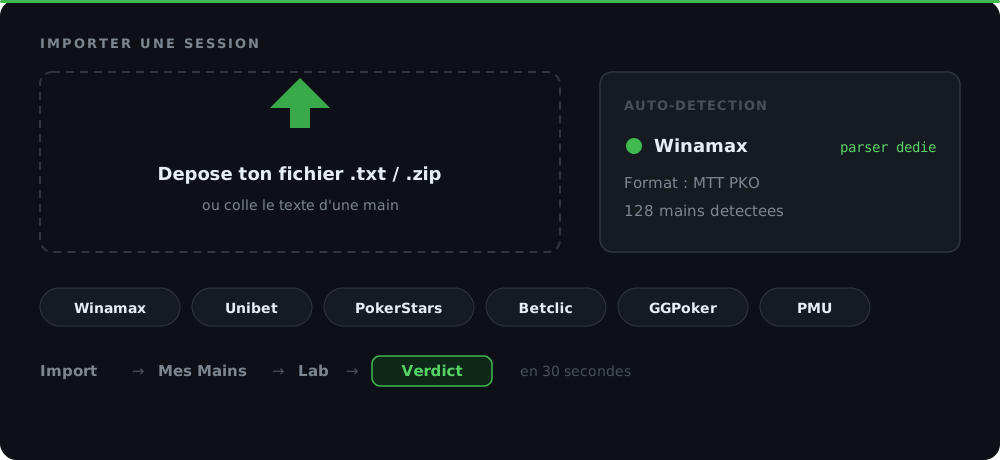
The 6 supported rooms and their quirks
| Room | Cash | MTT | PKO | Format note |
|---|---|---|---|---|
| Winamax | ✅ | ✅ | ✅ | FR / IT / ES, standard text format |
| Unibet | ✅ | ✅ | ✅ | Hash [Unibet_xxx] after hero name, MTT bounty headers |
| PokerStars | ✅ | ✅ | ✅ | Currency prefix (€/$) on values, decimals in cash |
| Betclic | ✅ | ✅ | — | € symbol as prefix on every action ("bets €0.50") |
| GGPoker | ✅ | ✅ | ✅ | Standard format, hero stats anonymised in exports |
| PMU | ✅ | ✅ | — | Proprietary format, dedicated parser |
Each parser is end-to-end tested (parsers/*.test.ts in the code) with real fixtures. If you find a format that parses badly, it's a bug — not a missing feature.
Per-room quirks (and how GrindLab handles them)
Winamax
Most stable text format. Hands_*.txt exports or session ZIPs contain blinds, actions, board, positions. The parser auto-detects currency (€ FR / EUR IT / € ES). MTTs and PKOs have specific headers with buy-in and initial bounty — extracted and stored in the spot config.
Note: on Winamax, sit-and-go's sometimes display position as BTN_SB / BTN_BB in heads-up. The parser maps these to standard BTN / BB.
Unibet
Main quirk: Unibet appends a hash after your screen name for PKO sessions (like Paulm [Unibet_abc123]). Without cleanup, it would pollute display and break filters. The parser strips this suffix systematically across all consumers (replayer, stats, share).
Other subtlety: Unibet cash exports were historically sometimes dropped (fixed end-2025 in aac5dd8). If you have Unibet cash sessions that don't import, make sure you're on the latest version — the parser covers all current Unibet formats.
For PKO, the initial bounty is extracted from the tournament header. When you send a hand to the Lab, the spot's MTT config includes the bounty value automatically, and the EV breakdown integrates it in the showdown-win term.
PokerStars
PokerStars cash games use a currency prefix on all values: Big blind: €0.50, bets €1.20, etc. The parser detects the symbol, normalises everything to bb, and preserves the currency in metadata (for exports / shared views).
Tournaments are in normalised chips. The parser detects the format (cash vs MTT) at the header.
Betclic
Betclic puts the € symbol in front of every amount (like bets €2.50 instead of bets 2.50). The parser handles this specific format. Also: Betclic 6-max / 8-max positions aren't necessarily in canonical order — the parser re-orders to match the standard order (UTG → HJ → CO → BTN → SB → BB).
GGPoker
Relatively standard format. GG exports with hero stats anonymised by default — not problematic for analysis but good to know.
PMU
Proprietary parser for the French room PMU.fr. Uncommon format but supported.
The import workflow: ZIP, auto-detect, bulk
You can:
- Drop a single file (
Hands_20260513.txt) → single import. - Drop several files at once → batch import, each file becomes a cluster.
- Drop a ZIP (like
WinamaxHistory.zip) → GrindLab unzips and imports everything.
Auto-detection: the parser inspects the first lines to identify the room. No "select your room" dropdown to fiddle with before each import. If multiple formats are mixed in a ZIP (rare but possible if you mix your histories), each file is parsed independently.
Progress bar: for big imports (1000+ hands), a live counter shows hands parsed and a "this might take a few seconds" disclaimer. No timeout — the server processes batches.
Conflicts / duplicates: if a hand is already imported (same hand ID + same room), it's silently skipped. You can re-import a session without duplicating.
From import to Lab: the 30-second flow
Once hands are imported:
-
My Hands page: the table shows your imports with filters (room, format, buy-in, position, result). The buy-in filter is adaptive — adjusts to your actual hand distribution (not a static list 1c/2c, 5c/10c, etc.).
-
View per format: for tournaments and PKO, GrindLab groups hands by tournament (containers view). For cash, it's a flat table. The default view is configurable.
-
Replayer: click a hand → modal replayer with:
- Per-player stats (VPIP / PFR / 3Bet on your imports).
- Street-by-street animation with pot tracking.
- Previous / Next buttons to navigate the session.
- Dealer button positioned tangent to the ring in HU for readability.
-
Analyze in Lab: at any street, the "Analyze in Lab" button sends the spot directly to the Lab. Board, sizings, pot, actions, and villain range (inferred if possible) are hydrated. The EV verdict with breakdown appears in a few seconds.
-
Smart Filters and exploit: from the Lab, you can apply MDF, Polarize, Value or Cap to model villain's calling range and see the exploitative EV. See the dedicated Smart Filters article.
Special case: Hand of the Day
If you import a hand that becomes your "Hand of the Day" (= daily hand, shared read-only on the dashboard widget), GrindLab automatically anonymises the other players' names. It's a GDPR measure: you can share your spots for community study without exposing other players' screen names.
Anonymisation is retroactive if you enable public sharing on an old hand.
Server cap: 100,000 hands per user
To avoid infinite drift (and preserve DB resources), GrindLab applies a 100,000 hands per user cap, enforced server-side. As you approach the cap, import shows a disclaimer; beyond, imports fail with a clear message indicating how many hands to delete.
This is enough for 99% of grinders. If you play 100k hands/month in high-volume cash, you'll need to archive your old sessions elsewhere (GrindLab export → local backup). On the Grinder plan, the cap stays identical but advanced features (bulk analysis, multi-hand comparisons) are unlocked.
Edge cases and troubleshooting
Corrupted hand history: sometimes a room exports a truncated file (line cut mid-action). The parser skips the corrupted hand and continues the batch. The import report shows the number of hands skipped.
Non-standard multiway format: if a 9-max hand has an atypical action sequence (like folds out of order), the parser does its best but may misposition players. Check the replayer to confirm.
Exotic currency: GrindLab handles €, $, £. For other currencies (yuan, real), values are parsed numerically but display falls back to the default. EV-side, no impact (everything normalised to bb).
Missing PKO bounty: if an imported PKO hand has no initial bounty in the header (parsing failure), you can set it manually in the spot's Game Config when sending it to the Lab.
Wrap-up
Import is the first link in the study chain — if it's friction, you don't analyse your hands. GrindLab covers the 6 major rooms with native parsers, auto-detection, and bulk via ZIP, to minimise that friction.
Three habits to build:
- Export your sessions while fresh, same day — many rooms purge histories after a few months or compress them into less readable archives.
- Drop the whole ZIP rather than individual files — bulk import is faster and preserves session structure.
- Tag your important hands (spot tags system in the Lab) to find them easily later when building your leak catalogue.
Import your last session from the My Hands page and click a hand to see it replay in seconds.
The method in 6 steps
Export your hand histories from the room
Each room has its own Export menu. Winamax: Tools → Hand History → Export. Unibet: Replayer → Export sessions. PokerStars: Tools → Instant Hand History → Export Hand Histories. Betclic: Account → Hand History → Download. GGPoker: My Stats → Hand History. PMU: Hand Replayer → Export. Text or ZIP format.
Open the Import Modal in GrindLab
My Hands page → 'Import' button top-right. Modal opens with a drop zone. You can drop a .txt file, several files, or a ZIP. Room and format are auto-detected at upload.
Verify the preview then confirm
Before finalising, GrindLab shows a preview: number of hands parsed per room, detected format, potential conflicts (duplicates, corrupted hands). You can exclude individual files before Import. Confirm — import runs in the background with a progress bar and live counter.
Filter and navigate in My Hands
Once imported, hands show up in the My Hands table. Filters: by room, by format (cash / MTT / PKO), by buy-in, by position, by result. The buy-in filter is adaptive (adjusts to your actual hand distribution). Default view is configurable per format (containers for tournaments, flat table for cash sessions).
Open the replayer to review the hand
Click a hand → replayer modal. Per-player stats (VPIP / PFR / 3Bet based on your own imports), street-by-street pot tracking, dealer button positioned in HU mode. Previous / Next buttons to navigate the session.
Send to Lab for EV analysis
In the replayer, at any street, click 'Analyze in Lab'. Villain's range, board, sizings and pot are hydrated in the Lab. The EV verdict with fold/call breakdown appears. If you have an MTT config with bounty, the PKO bounty is integrated automatically.